

Table of contents
- Overview
- Key benefits
- Cart reminders (Basket Reminders in the UK)
- Who will receive the email?
- FAQs
- The takeaway
Overview
Automated abandoned cart reminders help you bring back customers who left items in their carts without checking out. You can send reminders automatically using Cart Reminders on the Communication page. In the UK, this feature is called Basket Reminders.
Previous manual reminder setup no longer available (all regions)
If you previously configured abandoned cart reminders manually (email and SMS), please note that this feature has been discontinued and is no longer active.
It has been replaced by the new automated Cart Reminders system described in this article.
Any automated campaign notifications that relied on the old abandoned cart trigger will no longer be sent out. Please use the new Cart Reminders feature going forward.
Key benefits
- Turn abandoned carts into extra sales with timely reminders for busy parents and guardians.
- Earn more, effortlessly, with a system that runs 24/7 in the background.
- Quick and seamless setup that integrates with existing automated campaigns.
- Enhance the customer experience with thoughtful, well-timed follow-ups.
Cart recovery – data and insights
Our analysis shows that 19–40% of shopping carts remain incomplete after a visit.
We conservatively estimate that around 10% of these shoppers return to finalize their purchase after receiving a reminder.
In addition, data indicates that returning shoppers often spend more than originally intended. This means that cart recovery not only helps regain lost sales, but can also increase the average order value.
Cart reminders (Basket Reminders in the UK)
Cart reminders, called Basket Reminders in the UK, automatically send email nudges to customers who leave items in their basket without checking out.
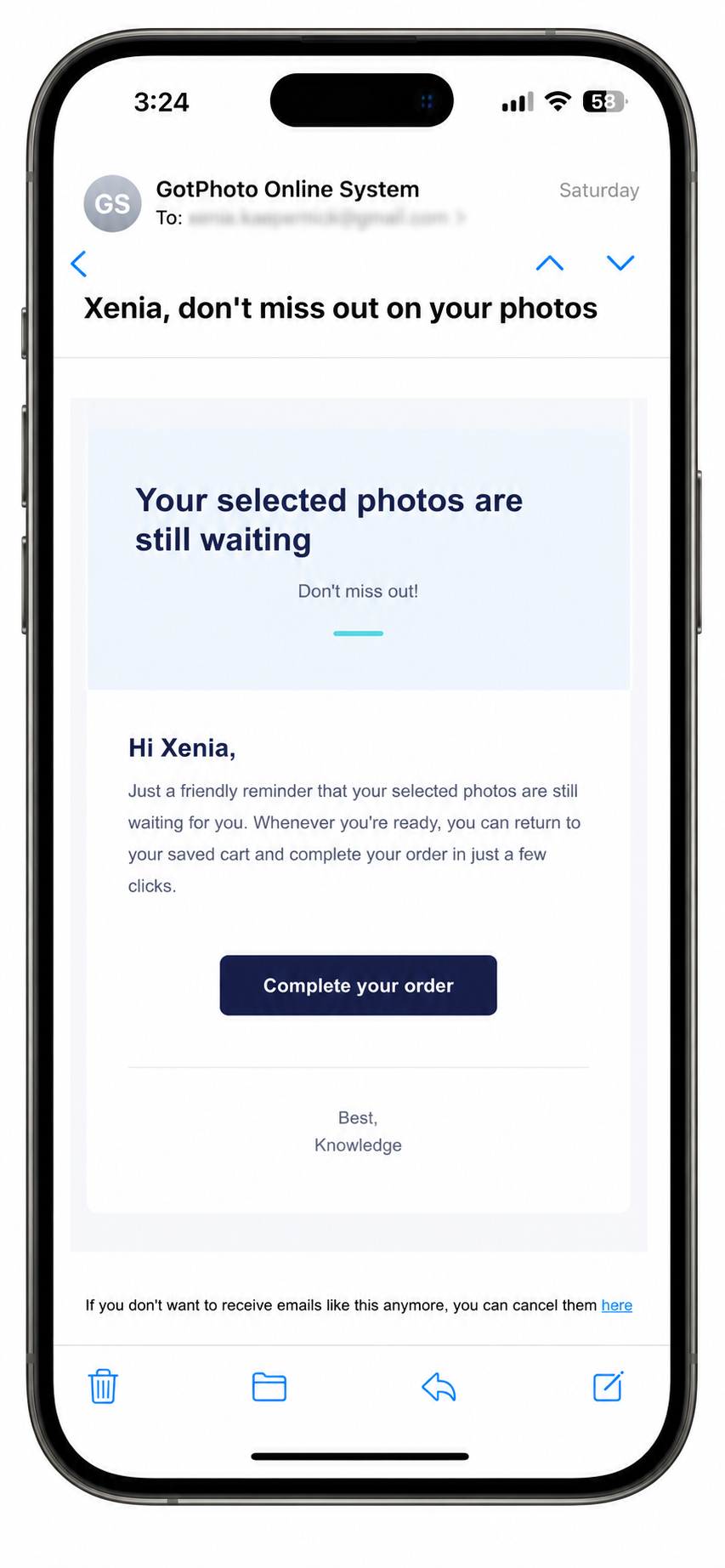
Reminder emails
Follow these steps to manage the cart reminders:
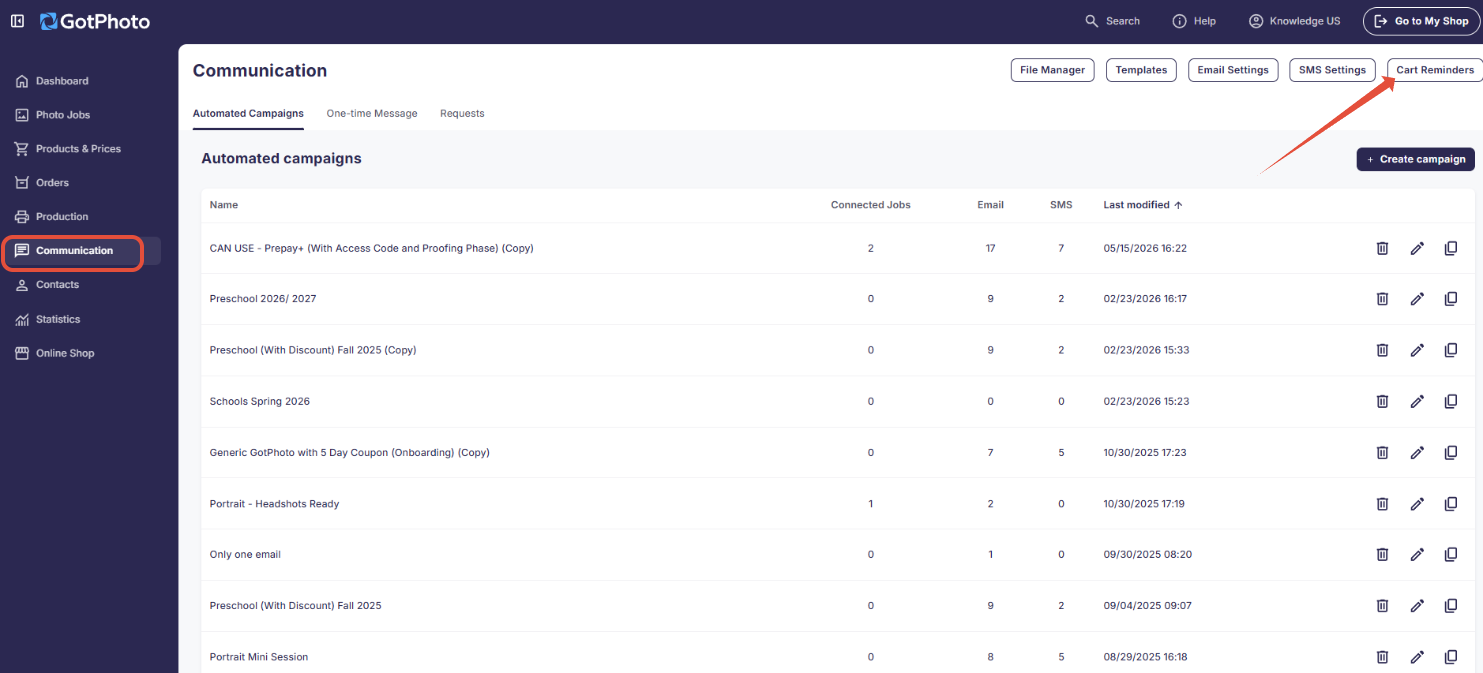
- Click the Cart Reminders button in the upper-right corner of the Communication page. In the UK, the button is called Basket Reminders.
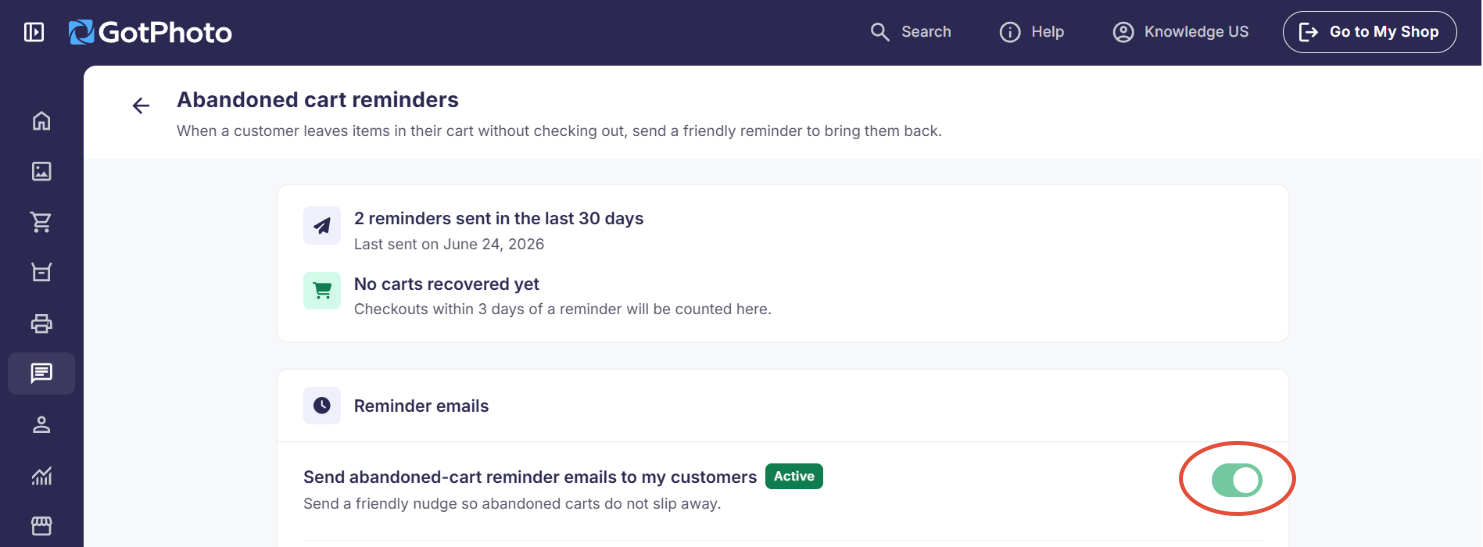
- Use the toggle to turn abandoned-cart reminder emails on or off. This feature is enabled by default once it's available for your account.
Reminder timing & content
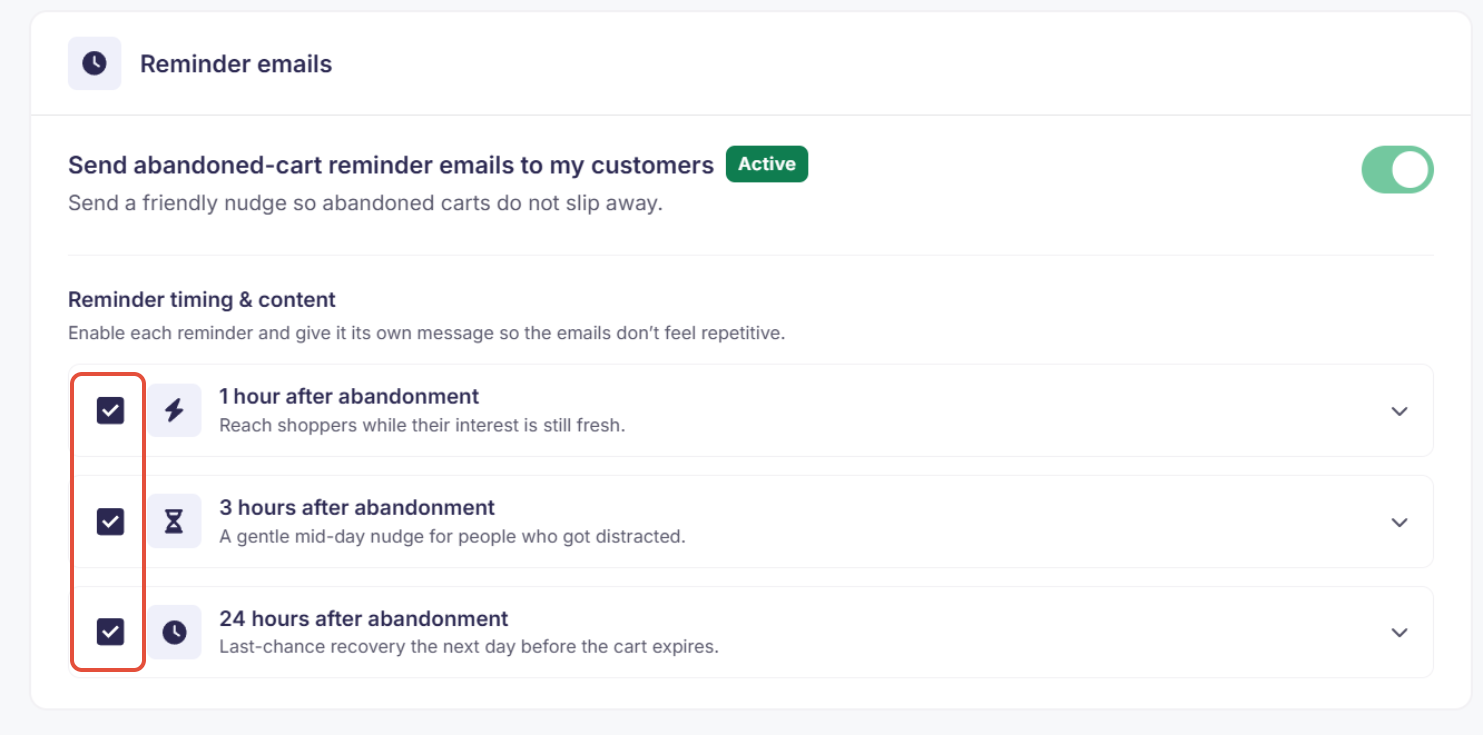
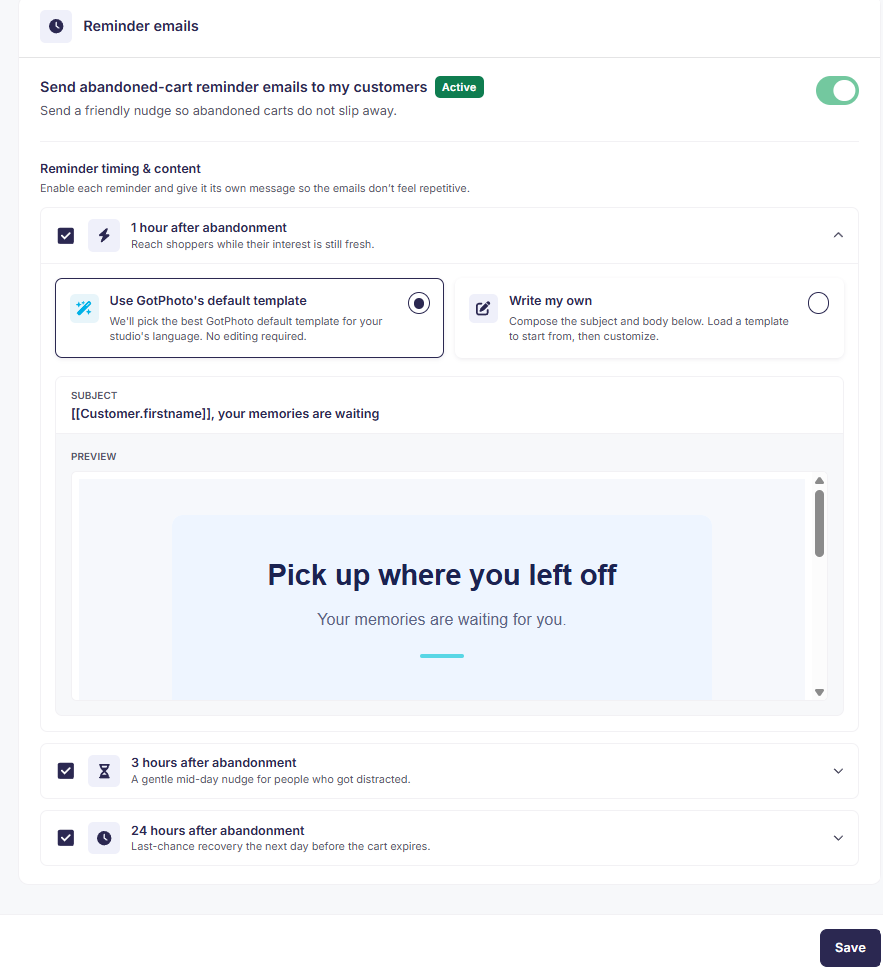
Enable multiple reminders at different intervals. Each reminder can have its own message, so the emails don't feel repetitive.
- Default reminder settings vary by region:
North America: All three reminder emails (1 hour, 3 hours, and 24 hours after cart abandonment) are enabled by default.
UK: Only the reminder email sent 24 hours after cart abandonment will be enabled by default.
You can adjust these settings at any time to suit your business needs.
- [Optional] Use the checkbox next to each timing option to enable or disable the reminder.
- For each enabled reminder, choose either to keep using GotPhoto's default template or write your own.
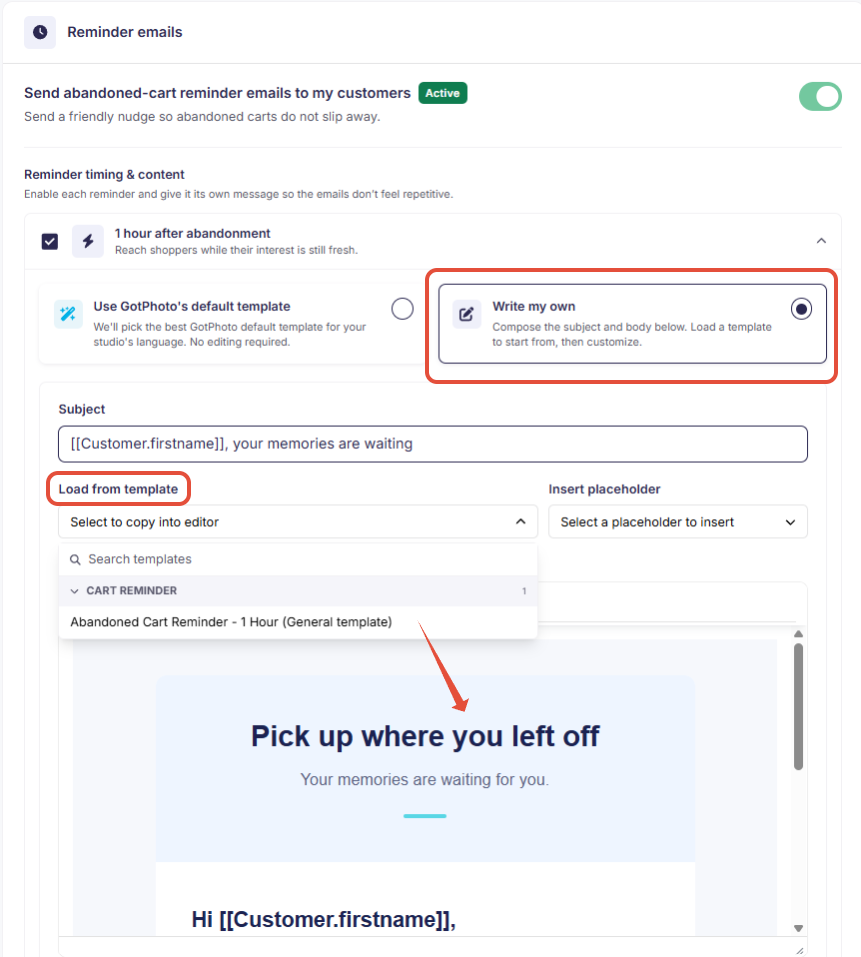
- Pro tip: When writing your own email, save time by adjusting the default template:
- Click the dropdown menu Load from template
- Select the cart abandonment category
- Select the corresponding template for your reminder email. This allows you to customize the subject line and message content while retaining the prominent call-to-action button, making it easy for customers to return to their cart and complete their order.
- A link to unsubscribe from emails will be automatically added.
- Click Save to apply your changes.
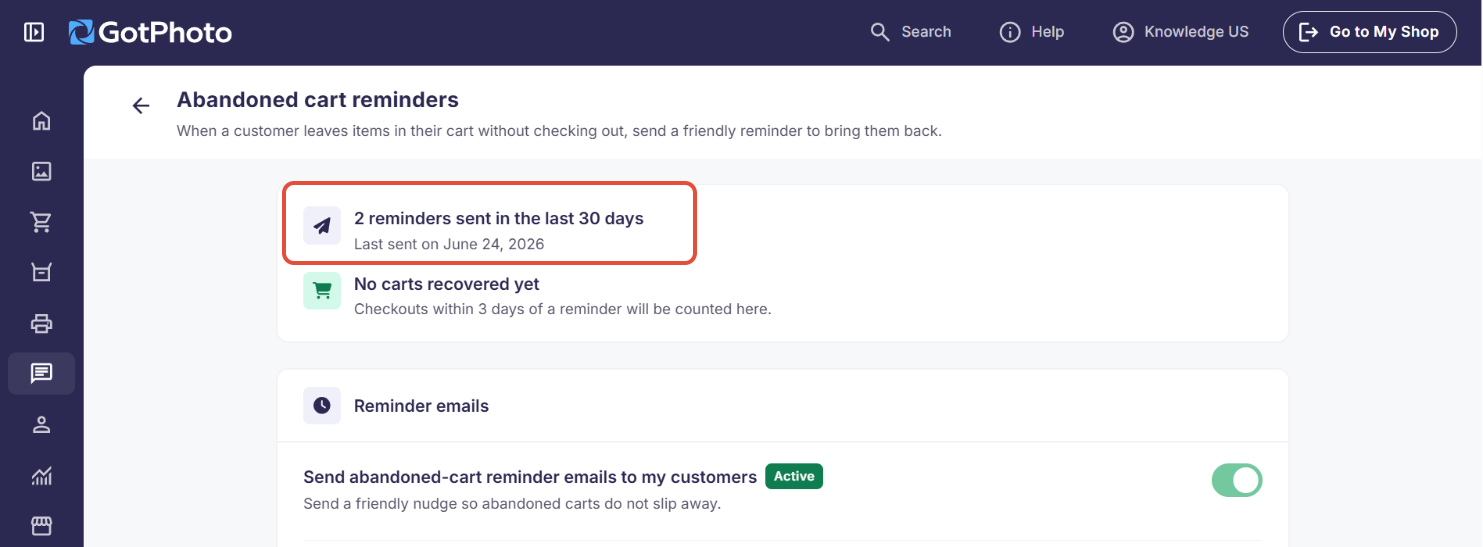
Note: A counter at the top of the page tracks how many reminders have been sent.
Who will receive the email?
The email will be sent to any customer who:
- Has a valid email address assigned to their job.
- Is subscribed to job communications.
- Has visited the shop, added items to their cart, and remained inactive for over 1 hour.
Standard consent rules apply. Unsubscribed customers will not receive emails.
FAQs
Are Cart Reminders and Basket Reminders the same feature?
Yes. The feature is called Cart Reminders in North America and Basket Reminders in the UK.
Which scenarios count as an abandoned cart?
A basket is considered abandoned when a potential buyer begins the purchase process but leaves before completing their order. This includes the following scenarios:
- A potential buyer starts the checkout process, enters their email address, but does not complete the purchase.
- A potential buyer logs in using the dynamic login link sent by email, adds items to their cart, but does not complete the purchase.
- A potential buyer logs in to their existing account (commonly used in the EU), adds items to their basket, but does not complete the purchase.
- A potential buyer signs up to receive future marketing emails, adds items to their cart, but does not complete the purchase.
When is a cart considered abandoned?
The abandonment timer starts from the last time the parent adds, removes, or updates an item in their cart. If the purchase is not completed before the configured delay expires, the cart is considered abandoned, and the cart abandonment workflow is triggered.
Do I have to enable the reminder emails?
There's nothing you need to do to get started. The system automatically sends abandoned cart reminder emails by default. For customers in North America, reminders are sent 1 hour, 3 hours, and 24 hours after cart abandonment. For customers in the UK, only the 24-hour reminder will be enabled by default once the feature is available in that region. You can adjust the settings at any time under Communication > Cart Reminders.
I used the old cart abandonment trigger in automated campaigns that was disabled, can
Will the abandonment emails appear in the customer's overview page?
No, they won't appear on the customer overview page.
My cart-abandonment page says 12 reminders were sent. Does that mean 12 different customers abandoned their cart and received the email?
Not necessarily. The number counts reminder emails sent, not the number of distinct customers who received them. The same customer can appear more than once in that total. For example, if they received a first reminder after 1 hour and a follow-up after 3 hours, or if they left items in more than one cart (they may have used their phone and their laptop in two different sessions), the counter doesn't distinguish between these cases. It only tells you how many reminder emails went out in total.
Will parents receive cart abandonment emails if they have unsubscribed?
No. If a parent has unsubscribed from marketing emails, they will not receive cart abandonment emails.
Is the email compatible with all shop types?
It works with both the online shop, but it is not yet supported in the prepay shop.
Is it possible to send an SMS reminder instead of an email?
At this time, these automated cart reminders can only be sent via email.
Can I use the placeholder [[Basket.recovery_url]] in custom communications (automated campaigns, one-time messages)?
No, the placeholder only works with the automated cart reminder feature.
If a customer returns to the cart after their job coupon or voucher has expired, will they still be able to use it?
No. Once the voucher has expired, it will be automatically removed from the cart.
If a customer removes all items from the cart before the respective time window expires, will a reminder email still be sent?
No. As long as the cart is completely emptied before the first configured time window expires, no automated cart reminder will be sent.
Will a cart reminder be triggered when I test the shop using a customer’s email link?
Yes, if you add items to the cart while using a customer’s email link, the customer may receive an automated cart reminder. To prevent this, remove all items from the cart before the first configured time window expires.
What happens if the gallery is archived after the customer has received the email?
If a job is archived, the link leads to the shop, but customers can't access the gallery.
When a customer clicks the link in the email, will they just be directed to the shop or to their cart?
They will be directed to their cart.
The takeaway
Automated abandoned cart reminders help you recover sales by reaching out to customers who added items to their cart but left without completing their purchase. These timely reminders not only encourage customers to return and finish their order, but also provide a helpful service for shoppers who may have been distracted or simply forgotten to check out.
For a simple, ready-to-use solution, manage automated cart reminders on the Communication page.