
Table of contents
- Overview
- Proper exposure
- Depth of field
- Sharp focus
- Image color profile
- Feet placement charts
- The takeaway
Overview
What image capture settings produce the best extractions?To get the best extractions, use a white background with correct exposure, sharp focus (aperture f/8 or higher), the sRGB color profile, and proper feet placement. These settings help the Next Gen design team preserve fine details like flyaways while ensuring clean edges. This article covers the key setup details for each of these areas.
Proper exposure
- What background should I use?
Use a solid white or near-white seamless background. The background should be evenly lit with no shadows, wrinkles, or color variation. A consistent, clean background allows the Next Gen design team to produce precise extractions and preserve fine details such as flyaways.
How should exposure, focus, and color profile be set?Use the following camera settings to ensure clean, accurate extractions.
- Capture properly exposed images where the subject is clearly separated from the background, without underexposing or overexposing.
- Use an aperture of f/8 or higher to maintain focus from front to back.
- Use autofocus to ensure consistently sharp results. Take advantage of face and eye detection features available in newer cameras for better accuracy.
- Submit images in the sRGB color space for best results.
Depth of field
- Use an aperture of f/8 or higher to maintain focus from front to back.
Sharp focus
- Use autofocus to ensure consistently sharp results.
- Take advantage of face and eye detection features available in newer cameras for better accuracy.
Image color profile
- Submit images in the sRGB color space for best results.
Feet placement charts
- How should the shooting environment and feet placement be set up?
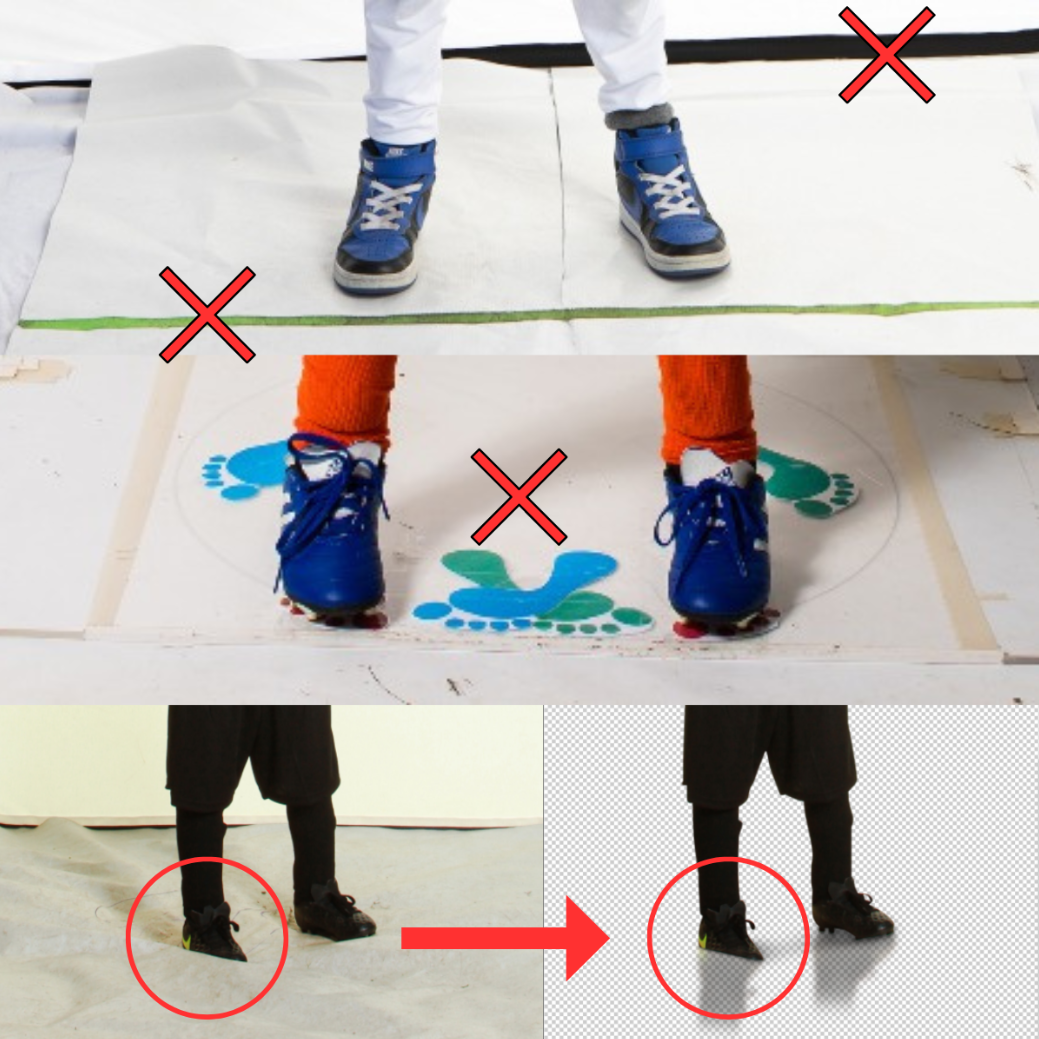
Proper background and floor setup ensures clean edges and full-body extractions.
- Ensure seamless color flow from floor to background with no gaps.
- If using a placement chart, make sure it matches your background color. Avoid bright mats that contrast with the background.
- Double-check the athlete's feet are fully visible and not blocked by fabric or uneven flooring.
- Ensure seamless color flow from floor to background with no gaps.
- Double-check the athlete’s feet are fully visible and not blocked by fabric or uneven flooring.
The takeaway
Quick-reference checklist- Clean white background: evenly lit with no shadows or wrinkles.
- Correct exposure: no underexposure or overexposure.
- Aperture of f/8 or higher for full depth of field.
- Autofocus enabled; use face and eye detection where available.
- Images submitted in the sRGB color space.
- Seamless floor-to-background transition with no gaps.
- Placement chart matches background color, no bright contrasting mats.
- Athlete's feet fully visible and unobstructed.