
![Banner showing the note [This content is relevant to customers in US & Canada]](https://help.gotphoto.com/hs-fs/hubfs/North%20America%20Banner.png?width=670&height=179&name=North%20America%20Banner.png)
Overview
Before you can send text messages to a customer, that customer must agree to receive them. This agreement is called SMS opt-in or SMS consent.
- Who this applies to: Photographers in the US and Canada who have finished setting up text messaging (SMS registration through Twilio) in GotPhoto.
- This article covers: The different ways customers can opt in, how GotPhoto stores each customer's choice, and what happens when a customer changes their mind.
- Key rule: GotPhoto always follows the customer's most recent choice, across all of your jobs.
If you have not set up text messaging yet, start with Set up your text message (SMS) settings.
Why customer consent is required by law
Text message marketing is strictly regulated, so you need a customer's clear permission before you text them.
- In the US, the Telephone Consumer Protection Act (TCPA) requires customers to explicitly agree before they receive marketing text messages. Some states, such as Texas, have additional rules.
- Every text message must give customers a way to opt out. GotPhoto adds "Reply STOP to opt-out" to your messages automatically.
- GotPhoto saves a record of each opt-in collected in GotPhoto, including the date and time and the consent wording the customer saw.
- If you add phone numbers that you collected outside of GotPhoto, for example on a paper form, you are responsible for keeping your own proof of consent.
GotPhoto provides tools that support compliance but cannot provide legal advice. For details and best practices, see SMS marketing compliance and best practices (US & Canada only). If you are unsure about your obligations, please talk to a legal advisor.
Ways customers can opt in to text messages
Customers can opt in in different places. In some, customers make the choice themselves. In others, you record the choice for them.
Opt in during online shop registration
Customers can opt in when they register for picture day or fill in a shop registration form.
- The customer opens the registration form.
- To receive text messages, the customer enters their phone number.
- To skip text messages, the customer leaves the phone number empty and continues with their email address only.
To collect SMS consent through shop registration, set your job's shop registration to Optional or Required. Both settings show customers the option to opt in to text messages. If shop registration is turned off, customers do not see the registration form and cannot opt in there.
The phone number field is always optional, and you cannot make it mandatory. Customers always decide for themselves whether they want to receive text messages.
Opt in when placing an order
Customers can opt in when they place a Prepay or Proofing order in your online shop.
- The customer enters their phone number during checkout.
- The customer chooses whether they want to receive text messages.
Add phone numbers with a names list
You can add customers' phone numbers when you upload a names list. Because the customers do not opt in themselves here, you must confirm that you have their permission.
- Upload a names list that contains phone numbers.
- Confirm that every customer on the list has agreed to receive text messages from you.
- If you cannot confirm this for some customers, remove their phone numbers from the names list before you upload it.
Update a customer record manually
You can change a customer's text message setting yourself.
- Open the customer's record.
- Set whether the customer should receive text messages.
- Save your changes.
Only opt a customer in if they have given you permission, and keep a record of that permission.
How GotPhoto stores a customer's text message choice
Each customer has one choice for text messages, and that choice applies to all of your jobs.
- Each customer has one customer record.
- Each customer record has one text message status: opted in or not opted in. You can review the status on their customer overview page (Actions > Edit customer)
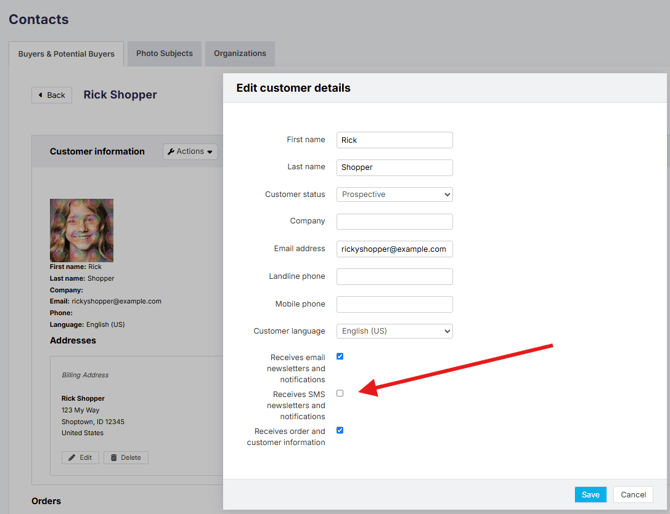
- This status is shared across every job the customer belongs to.
- GotPhoto always uses the customer's latest choice. A change in one job changes the status for all jobs.
What can switch text messages off for a customer
These actions replace an earlier opt-in. For example, a customer opted in to text messages in Job A. Any of the following switches text messages off for that customer in Job A and in all other jobs:
| Where it happens | What happens | Result |
|---|---|---|
| Names list | You add the customer to Job B with their email address but no phone number. | No more text messages for any job |
| Shop registration | The customer logs in and enters only their email address in the registration form. | No more text messages for any job |
| Reply STOP | The customer replies STOP to one of your text messages. | No more text messages for any job |
To avoid switching off text messages by accident, include phone numbers in names lists for customers who have already opted in.
Why GotPhoto always follows the latest choice
GotPhoto takes a careful approach to protect your customers' privacy and to help you follow text message laws.
- Following the latest choice makes sure customers who no longer want text messages stop receiving them.
- Customers have different preferences for how they want to hear from you.
- Use a mix of email and text messages so important messages, such as order deadlines, reach as many customers as possible.
To send a text message to your customers, see Send a one-time message (SMS).
FAQs
Can a customer use the online shop without opting in to text messages?
Yes. Customers can register and order with their email address only. They will still receive your email messages.
A customer opted in, but no longer gets text messages. Why?
The customer's latest action replaced their opt-in. For example, they replied STOP, registered again with only their email address, or were added to another job through a names list without a phone number.
Does opting out in one job affect my other jobs?
Yes. Each customer has one text message status that applies to all jobs.
Can I upload phone numbers I collected on a paper form?
Yes, if the customer agreed to receive text messages. You must confirm consent when uploading the names list and keep your own record of that consent.
How do customers stop text messages?
Customers reply STOP to any text message. GotPhoto adds this instruction to every message automatically.
The takeaway
- Customers must agree to receive text messages before you can text them. This is a legal requirement in the US and Canada.
- Customers opt in during shop registration or when placing a Prepay or Proofing order.
- You can opt customers in with a names list or by updating their customer record, but only with their permission.
- Each customer has one text message status that applies to all of your jobs.
- GotPhoto always follows the customer's latest choice, including STOP replies.
- If available, use both email and text messages to reach as many customers as possible.
Related articles