---
title: Why special characters or rosters may not import correctly in GotPhoto
description: GotPhoto requires a names list in UTF-8 format
---
[Skip to content](https://help.gotphoto.com/en/support/why-special-characters-or-rosters-may-not-import-correctly-in-gotphoto#main-content)
- [English](https://help.gotphoto.com/en/support/why-special-characters-or-rosters-may-not-import-correctly-in-gotphoto)
- [Deutsch – Deutschland](https://help.gotphoto.com/de-de/support/zeichen-werden-nach-dem-import-in-der-namensliste-nicht-korrekt-angezeigt)
English
Show submenu for translations

Open main navigation
Close main navigation
- - [English](https://help.gotphoto.com/en/support/why-special-characters-or-rosters-may-not-import-correctly-in-gotphoto)
- [Deutsch – Deutschland](https://help.gotphoto.com/de-de/support/zeichen-werden-nach-dem-import-in-der-namensliste-nicht-korrekt-angezeigt)
English
Show submenu for translations
Hello. How can we help you?
- There are no suggestions because the search field is empty.
1. [Help Center](https://help.gotphoto.com/en/support?hsLang=en)
2. [Troubleshooting](https://help.gotphoto.com/en/support/troubleshooting?hsLang=en)
3. [Access Codes](https://help.gotphoto.com/en/support/troubleshooting?hsLang=en#access-codes)
August 17, 2026
# Why special characters or rosters may not import correctly in GotPhoto
**Table of contents**
- [Overview](https://help.gotphoto.com/en/support/why-special-characters-or-rosters-may-not-import-correctly-in-gotphoto#Overview)
- [The issue](https://help.gotphoto.com/en/support/why-special-characters-or-rosters-may-not-import-correctly-in-gotphoto#The-issue)
- [The root cause](https://help.gotphoto.com/en/support/why-special-characters-or-rosters-may-not-import-correctly-in-gotphoto#The-root-cause)
- [The solution](https://help.gotphoto.com/en/support/why-special-characters-or-rosters-may-not-import-correctly-in-gotphoto#The-solution)
- [The takeaway](https://help.gotphoto.com/en/support/why-special-characters-or-rosters-may-not-import-correctly-in-gotphoto#The-takeaway)
### **Overview**
Sometimes after importing a roster, names may display incorrectly, imports may get stuck, or the file may not open at all. This is usually caused by file encoding issues that affect how special characters are handled.
---
### **The issue**
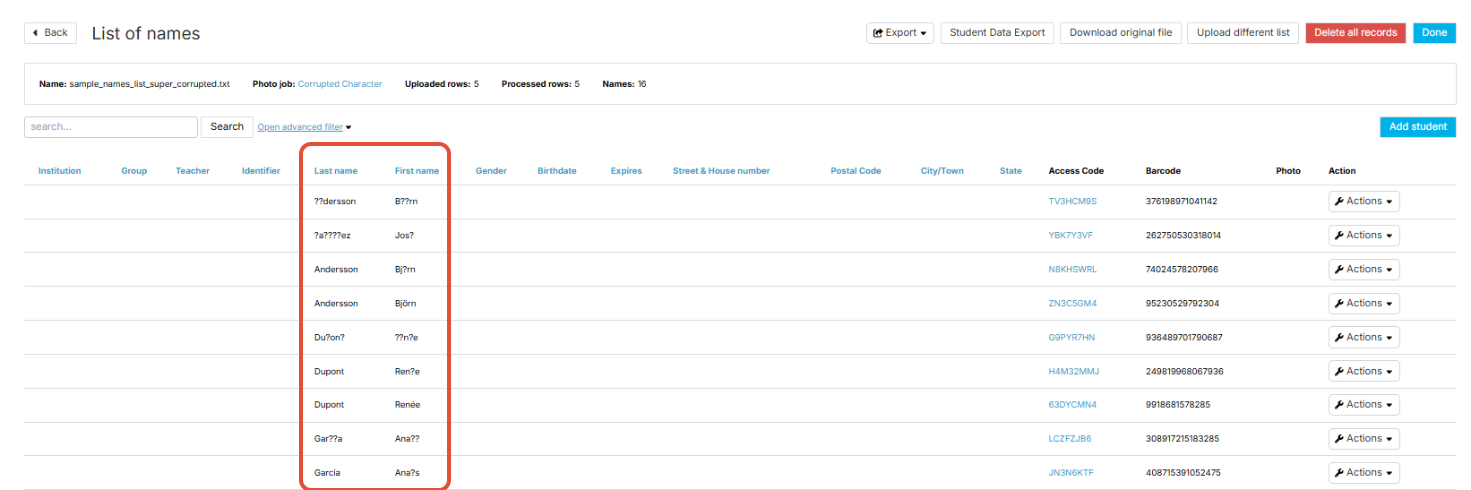
After importing your roster, certain characters may not display correctly in your names list or QR cards. In some cases, the roster import may freeze, or you may be unable to open the list after upload.
---
### **The root cause**
GotPhoto requires names lists to be saved in **UTF-8 format**. If your file is in another format, special characters like accented letters or symbols may appear as random icons or question marks. Non-UTF-8 encoding can also cause import errors.
---
### **The solution**
Before uploading your roster, make sure the file is encoded in UTF-8. Below are instructions for saving in UTF-8 using different tools.
### **For CSV files**
You can save your CSV file in UTF-8 format using a text editor or Excel.
#### **If using Notepad (Windows):**
1. Open the CSV file in Notepad.
2. Go to **File → Save As**.
3. In the **Save as type** dropdown, select *All Files*.
4. In the **Encoding** dropdown, choose *UTF-8*.
5. Save the file.
#### **If using TextEdit (Mac):**
1. Open the CSV file in TextEdit.
2. Go to **File → Export As**.
3. Under **Plain Text Encoding**, select *Unicode (UTF-8)*.
4. Save the file.
#### **If using Excel:**
1. Open the CSV file in Excel.
2. Go to **File → Save As**.
3. From the file type dropdown, select *CSV UTF-8 (Comma delimited) (\*.csv)*.
4. Save the file.
### **For Excel files (exporting to CSV)**
1. Open the Excel file.
2. Go to **File → Save As**.
3. Select *CSV UTF-8 (Comma delimited) (\*.csv)* as the file type.
4. Save the file.
---
### **The takeaway**
Incorrectly displayed names or failed imports usually mean your file is not in UTF-8 format. Always ensure your CSV or Excel file is saved in UTF-8 encoding before uploading to GotPhoto to avoid issues with special characters or failed roster imports.
- [Getting Started](https://help.gotphoto.com/en/support/getting-started?hsLang=en#main-content)
- [One-Time Settings](https://help.gotphoto.com/en/support/getting-started?hsLang=en#one-time-settings)
- [Price Lists and Product Packages](https://help.gotphoto.com/en/support/getting-started?hsLang=en#price-lists-and-product-packages)
- [Your Online Shop](https://help.gotphoto.com/en/support/getting-started?hsLang=en#your-online-shop)
- [Communication With Customers](https://help.gotphoto.com/en/support/getting-started?hsLang=en#communication-with-customers)
- [Upselling Options](https://help.gotphoto.com/en/support/getting-started?hsLang=en#upselling-options)
- [Navigation](https://help.gotphoto.com/en/support/getting-started?hsLang=en#navigation)
- [How-To's](https://help.gotphoto.com/en/support/how-tos?hsLang=en#main-content)
- [Review Phase](https://help.gotphoto.com/en/support/how-tos?hsLang=en#review-phase)
- [Sales Phase](https://help.gotphoto.com/en/support/how-tos?hsLang=en#sales-phase)
- [Workflow Guides for Specific Scenarios](https://help.gotphoto.com/en/support/how-tos?hsLang=en#workflow-guides-for-specific-scenarios)
- [Planning Phase](https://help.gotphoto.com/en/support/how-tos?hsLang=en#planning-phase)
- [Picture Day Phase](https://help.gotphoto.com/en/support/how-tos?hsLang=en#picture-day-phase)
- [Manage your Account](https://help.gotphoto.com/en/support/how-tos?hsLang=en#manage-your-account)
- [GotPhoto's Editing Services](https://help.gotphoto.com/en/support/gotphotos-editing-services?hsLang=en#main-content)
- [GotPhoto's Editing Services](https://help.gotphoto.com/en/support/gotphotos-editing-services?hsLang=en#gotphotos-editing-services)
- [Sports Graphics Creation Service by Next Gen](https://help.gotphoto.com/en/support/sports-graphics-creation-service-by-next-gen?hsLang=en#main-content)
- [Next Gen](https://help.gotphoto.com/en/support/sports-graphics-creation-service-by-next-gen?hsLang=en#next-gen)
- [Entagged & GotPhoto Tagging App](https://help.gotphoto.com/en/support/entagged-gotphoto-tagging-app?hsLang=en#main-content)
- [Master Entagged with Comprehensive Tutorials.](https://help.gotphoto.com/en/support/entagged-gotphoto-tagging-app?hsLang=en#master-entagged-with-comprehensive-tutorials)
- [Entagged Troubleshooting](https://help.gotphoto.com/en/support/entagged-gotphoto-tagging-app?hsLang=en#entagged-troubleshooting)
- [GotPhoto Tagging App](https://help.gotphoto.com/en/support/entagged-gotphoto-tagging-app?hsLang=en#gotphoto-tagging-app)
- [Business & Growth](https://help.gotphoto.com/en/support/business-growth?hsLang=en#main-content)
- [Stripe & Accounting Resources](https://help.gotphoto.com/en/support/business-growth?hsLang=en#stripe-accounting-resources)
- [Best practices](https://help.gotphoto.com/en/support/business-growth?hsLang=en#best-practices)
- [Webinars](https://help.gotphoto.com/en/support/business-growth?hsLang=en#webinars)
- [Templates and Downloads](https://help.gotphoto.com/en/support/business-growth?hsLang=en#templates-and-downloads)
- [GotPhoto Referral Program](https://help.gotphoto.com/en/support/business-growth?hsLang=en#gotphoto-referral-program)
- [UK Materials](https://help.gotphoto.com/en/support/business-growth?hsLang=en#uk-materials)
- [Troubleshooting](https://help.gotphoto.com/en/support/troubleshooting?hsLang=en#main-content)
- [Uploading Photos](https://help.gotphoto.com/en/support/troubleshooting?hsLang=en#uploading-photos)
- [Customer-Facing Issues](https://help.gotphoto.com/en/support/troubleshooting?hsLang=en#customer-facing-issues)
- [Access Codes](https://help.gotphoto.com/en/support/troubleshooting?hsLang=en#access-codes)
- [Managing Names Lists](https://help.gotphoto.com/en/support/troubleshooting?hsLang=en#managing-names-lists)
- [Customer Outreach](https://help.gotphoto.com/en/support/troubleshooting?hsLang=en#customer-outreach)
- [Customizing Your Shop](https://help.gotphoto.com/en/support/troubleshooting?hsLang=en#customizing-your-shop)
- [Your Account](https://help.gotphoto.com/en/support/troubleshooting?hsLang=en#your-account)
- [Price Lists](https://help.gotphoto.com/en/support/troubleshooting?hsLang=en#price-lists)
- [Student Data Export](https://help.gotphoto.com/en/support/troubleshooting?hsLang=en#student-data-export)
- [DIY Sports Graphic Creation & Group Composites](https://help.gotphoto.com/en/support/diy-sports-graphic-creation-group-composites?hsLang=en#main-content)
- [Workflow Resources: QSuite, Pixnub & Team Photo Composite](https://help.gotphoto.com/en/support/diy-sports-graphic-creation-group-composites?hsLang=en#workflow-resources-qsuite-pixnub-team-photo-composite)
- [GotPhoto North America](https://www.gotphoto.com/)
- [T&Cs US](https://www.gotphoto.com/gtc-us/)
- [T&Cs Canada](https://www.gotphoto.com/gtc-ca/)
- [Privacy Policy US](https://www.gotphoto.com/data-privacy-policy-us/)
- [Privacy Policy Canada](https://www.gotphoto.com/data-privacy-policy-ca/)
- [DPA US](https://www.gotphoto.com/dpa-us/)
- [DPA Canada](https://www.gotphoto.com/dpa-ca/)
- [TOMs & sub-processors US](https://www.gotphoto.com/toms-and-sub-processors-us/)
- [TOMs & sub-processors Canada](https://www.gotphoto.com/toms-and-sub-processors-ca/)
- [GotPhoto UK](https://www.gotphoto.co.uk/)
- [T&C UK](https://www.gotphoto.co.uk/gtc/)
- [Privacy Policy UK](https://www.gotphoto.co.uk/data-privacy-policy/)
- [DPA UK](https://www.gotphoto.co.uk/dpa/)
- [TOMs & Sub-Processors UK](https://www.gotphoto.co.uk/toms-and-sub-processors/)
- [Cookie Declaration](https://app.gotphoto.com/cookie_declaration)
[](http://GotPhoto.com)
### GotPhoto North America
**Customer Care**
 +1 646-362-5100
 +1 365-809-1810
SupportUS@gotphoto.com
Support Hours:
Monday – Friday
9am – 7pm ET
### GotPhoto UK
**Customer Care**
+44 (0) 20 8068 8571
service@gotphoto.co.uk
Support Hours:
Monday – Friday
9am – 5pm GMT
Copyright © 2026, GotPhoto Inc.