---
title: The order details page
---
[Skip to content](https://help.gotphoto.com/en/support/the-order-details-page#main-content)
- [English](https://help.gotphoto.com/en/support/the-order-details-page)
- [Deutsch – Deutschland](https://help.gotphoto.com/de-de/support/die-neue-bestellubersicht-seite)
English
Show submenu for translations

Open main navigation
Close main navigation
- - [English](https://help.gotphoto.com/en/support/the-order-details-page)
- [Deutsch – Deutschland](https://help.gotphoto.com/de-de/support/die-neue-bestellubersicht-seite)
English
Show submenu for translations
Hello. How can we help you?
- There are no suggestions because the search field is empty.
1. [Help Center](https://help.gotphoto.com/en/support?hsLang=en)
2. [Getting Started](https://help.gotphoto.com/en/support/getting-started?hsLang=en)
3. [Navigation](https://help.gotphoto.com/en/support/getting-started?hsLang=en#navigation)
September 8, 2026
# The order details page
### **Overview**
We’ve redesigned the Order Details Page in our [new GotPhoto Design](https://help.gotphoto.com/en/support/the-new-gotphoto-online-shop?hsLang=en) to improve usability, speed, and clarity - especially for large or complex orders.
### **Access the order page**
You can find the Individual Order Page in two ways:
- Use the dashboard search tool, filter for orders, and enter the order number.
- Go to the [Orders tab](https://help.gotphoto.com/en/support/the-orders-page?hsLang=en) in the left menu and use the new "exact match" filter and date-range dropdown to find a specific order.
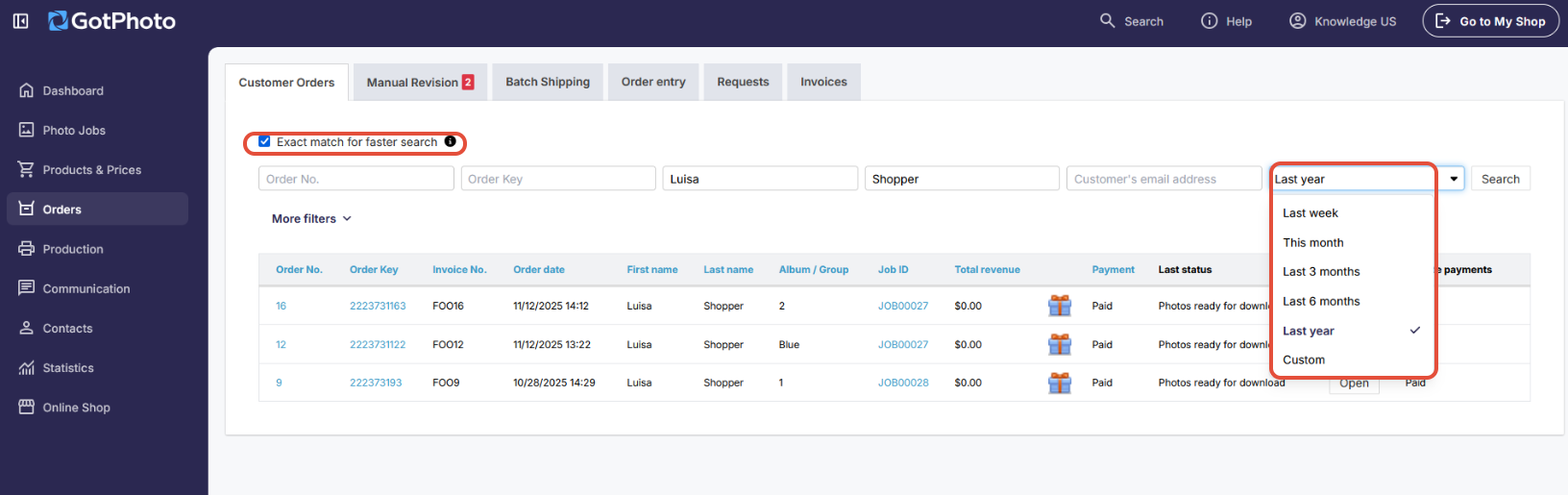
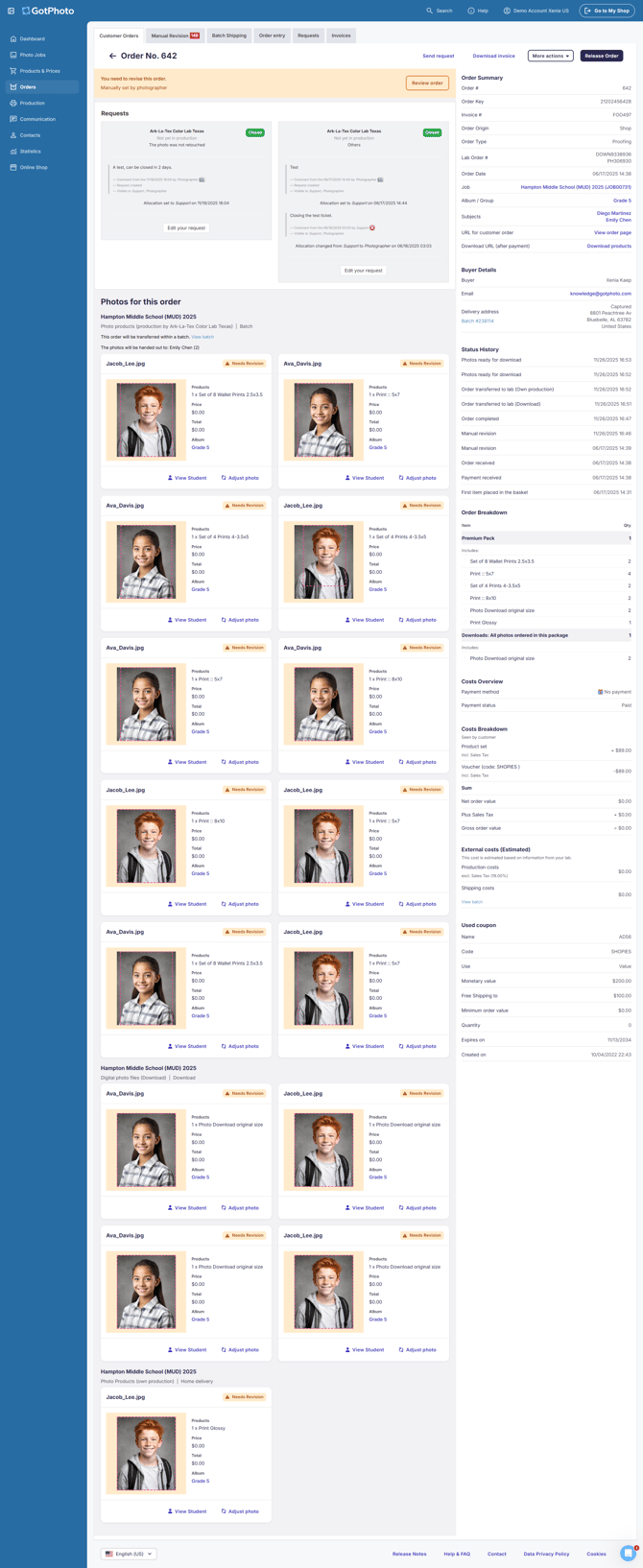
**Sample order view:**
### **Navigate the left panel**
The left side of the page includes key order features:
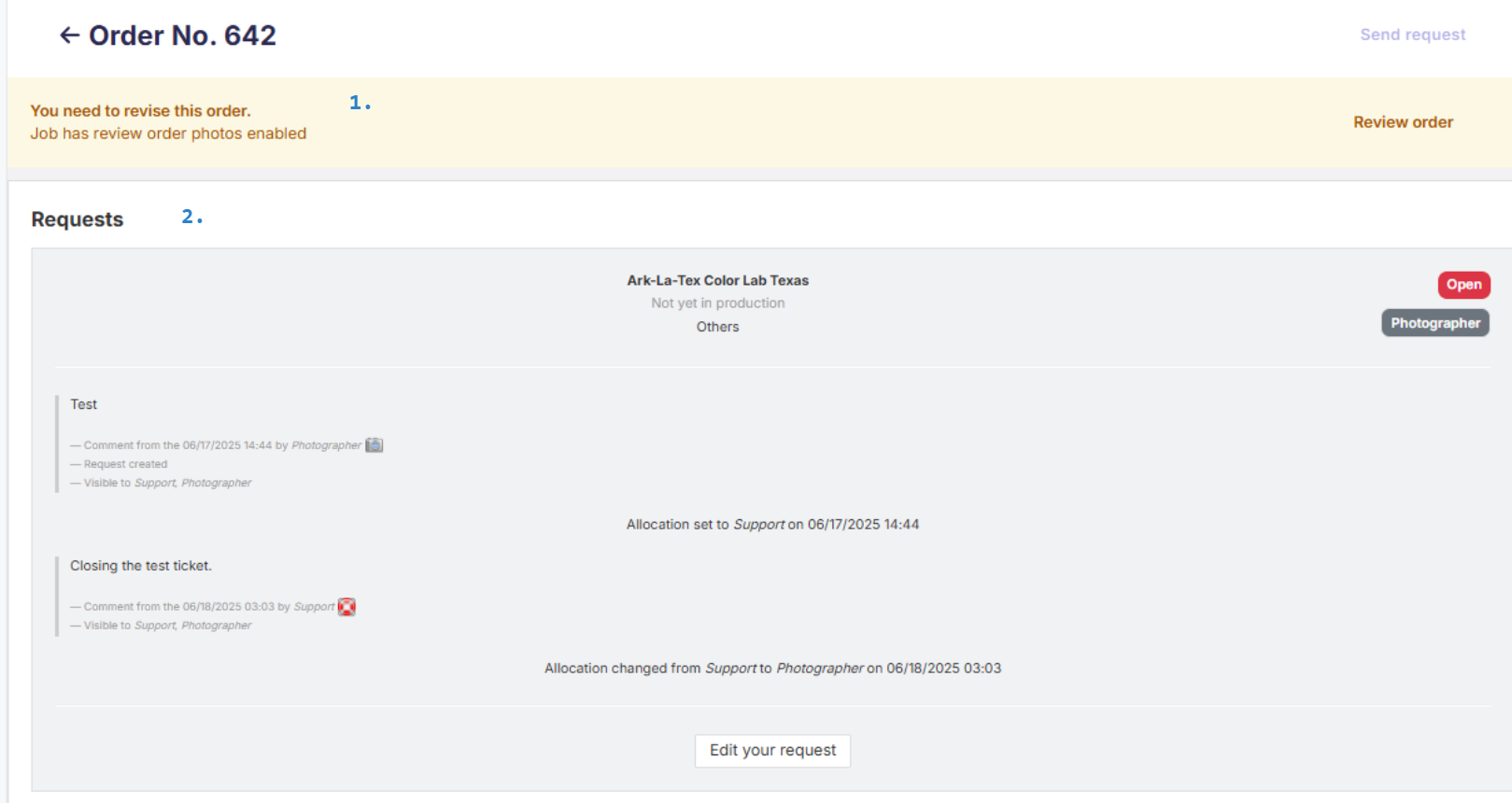
1. **Review order:** Visible only if [Manual Revision](https://help.gotphoto.com/en/support/use-manual-revision-for-photo-orders?hsLang=en) is enabled in the job.
2. **Requests:** Displays open or closed [requests](https://help.gotphoto.com/en/support/managing-customer-requests-complaints-in-gotphoto?hsLang=en) tied to the order.
3. **Photos for this order:** View all ordered images, their details, and links to each subject's gallery. The Adjust Photo option is only available for orders that are in [Manual Revision](https://help.gotphoto.com/en/support/use-manual-revision-for-photo-orders?hsLang=en). 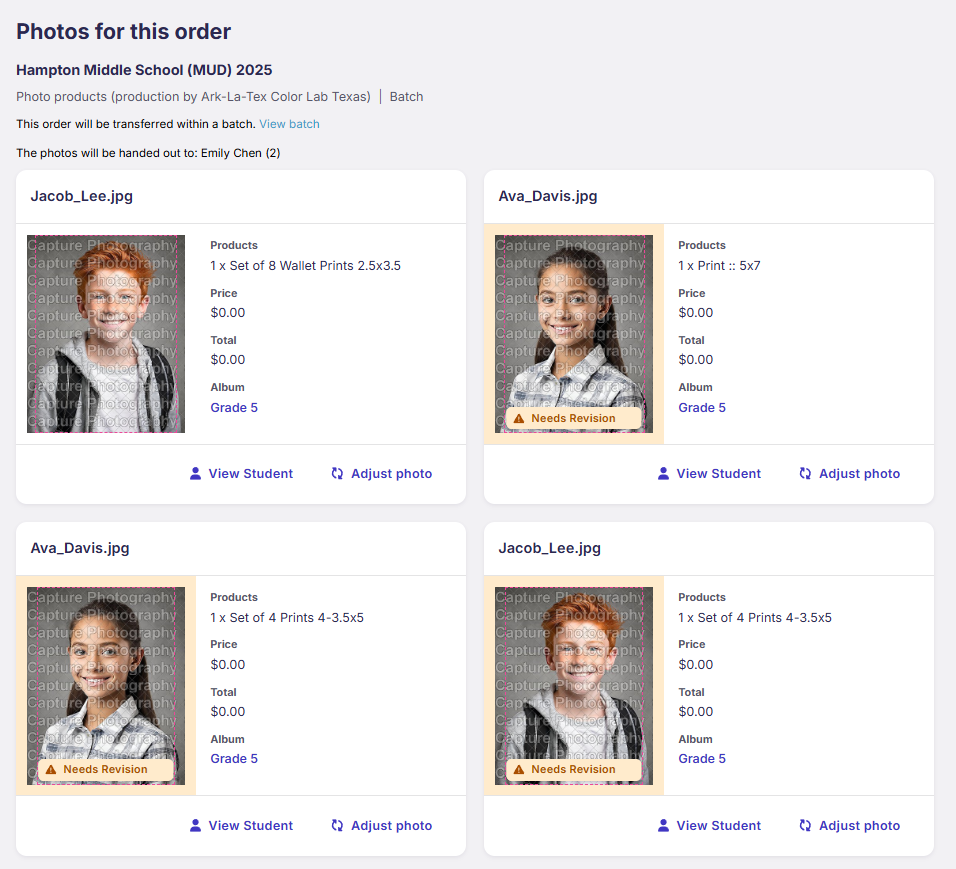
### **Navigate the right panel**
The right side shows key summary information:
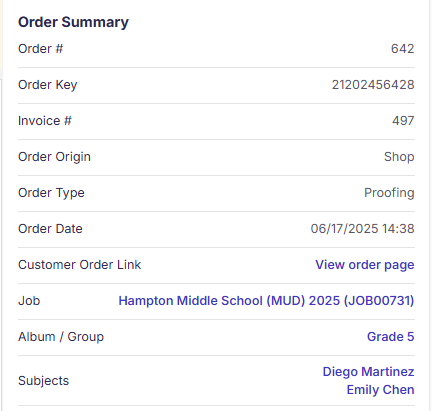
- **Order Summary:** Order and invoice numbers (invoice may be missing for [manual entries](https://help.gotphoto.com/en/support/manually-input-orders-via-order-entry?hsLang=en)).
- **Order Origin:** Indicates Shop or Order Entry.
- **Order Type:** Prepay or Proofing.
- **Customer Order Link:** Link sent in confirmation email.
Also visible:
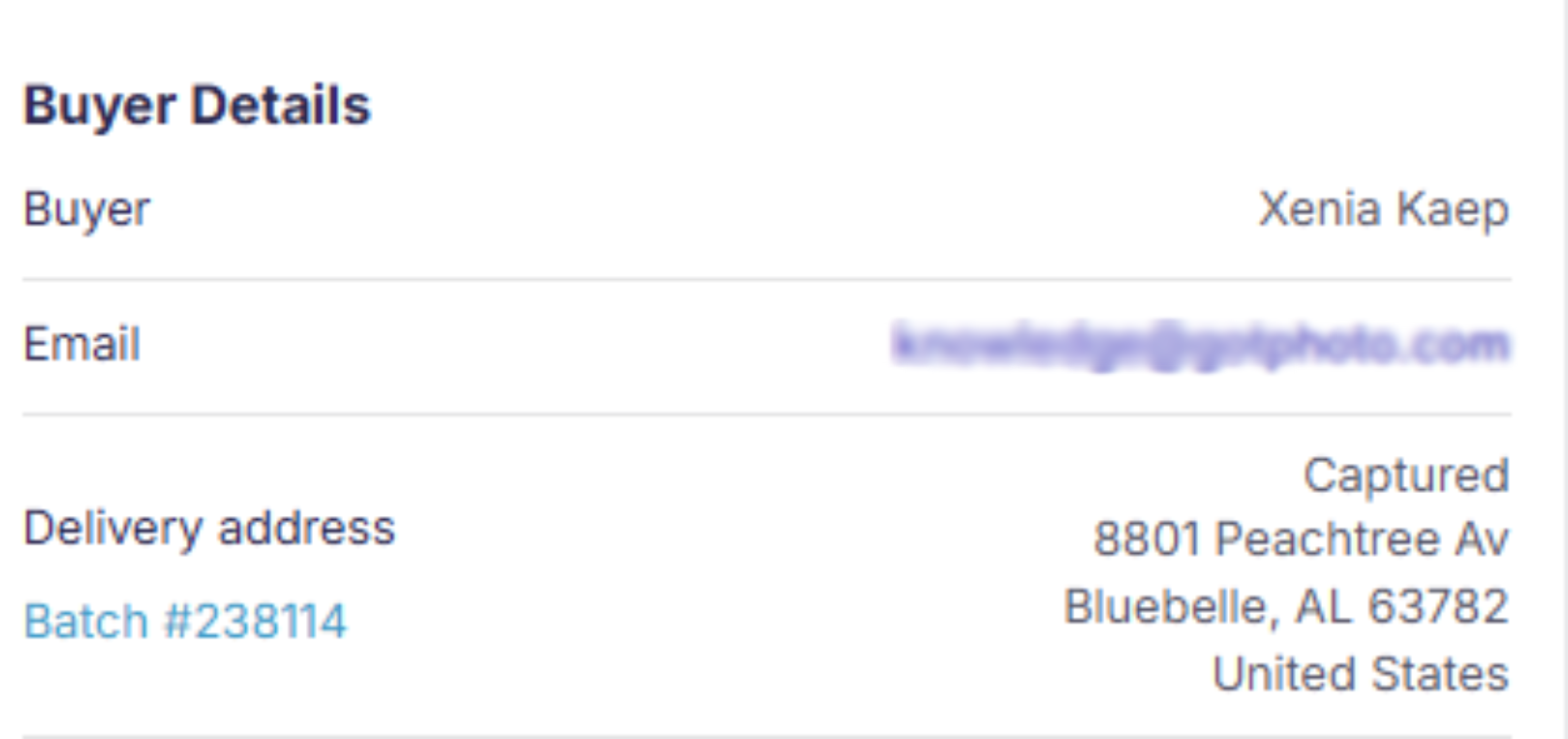
- **Buyer Details** (clickable emails link to customer overview)
- **Delivery Address**
- **Batch ID** (clickable if batch shipping)
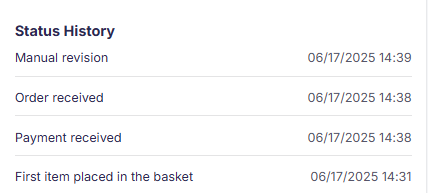
Status History
A timeline of order progress is shown next.
### **Understanding Order Statuses in GotPhoto**
Here are the typical GotPhoto order status timeline events you might see in the system, along with a description for each:
**First Item Placed in Basket**
The customer has added their first product (e.g., a photo or package) to their shopping basket, but has not yet started the checkout process.
**Basket Converted**
The customer has moved from just having items in their basket to actually starting the checkout process. This often means they have entered their details and are proceeding to payment.
**Order Received**
The system has registered a new order. This status is set as soon as the customer completes the checkout process, regardless of payment status.
**Payment Received**
Payment for the order has been successfully processed. This confirms that the order is paid and can move forward to fulfillment.
**Basket Processed**
The system has processed the basket, which may include generating order confirmations, updating inventory, and preparing the order for lab or photographer fulfillment.
**Payment Aborted**
The customer started the payment process but did not complete it. This could be due to cancellation, a failed transaction, or closing the browser.
**Photos Converted**
The ordered digital photos have been processed and converted, typically for download or delivery. This is relevant for digital-only orders.
**Order Shipped**
The order has been shipped to the customer. This status may trigger an automated notification email to the buyer.
**Order Delivered**
The order has been marked as delivered to the customer, either by tracking integration or manual update.
**Order Cancelled**
The order was canceled, either by the customer or by the photographer/admin.
**Note:** Not all events will appear for every order; the timeline is dynamic based on the order's journey.
Some events (like "Order Shipped" or "Order Delivered") may only appear if the photographer or lab uses GotPhoto's integrated shipping/tracking features.
### **Review the ordered products**
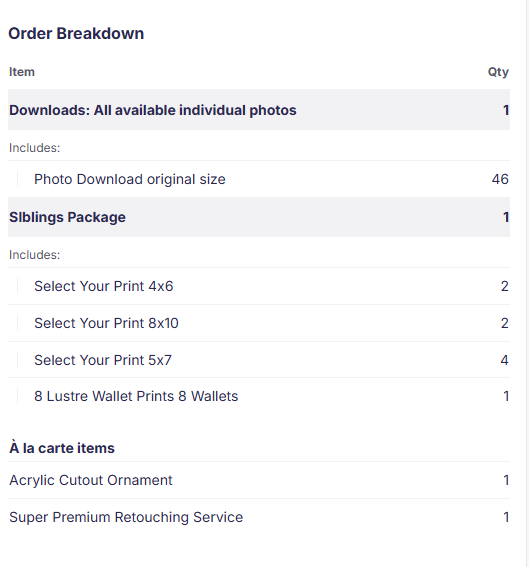
The order breakdown shows every product in the order, grouped into downloads, packages, and à la carte items, so you can see at a glance what the customer purchased and confirm it matches what they expected.
- Downloads: Digital download products included in the order. The number of photos included is shown as a sub-line below it.
- Packages: Each package name and the quantity ordered. The package's contents are listed below it with their own quantities.
- À la carte items: Individual add-on products purchased outside a package, such as prints, gift items, or retouching service, each with its quantity.
### **Review order financials**
- **Cost Overview:** Displays payment method and status.
- **Cost Breakdown:** Shows item, tax, discount, and total details.
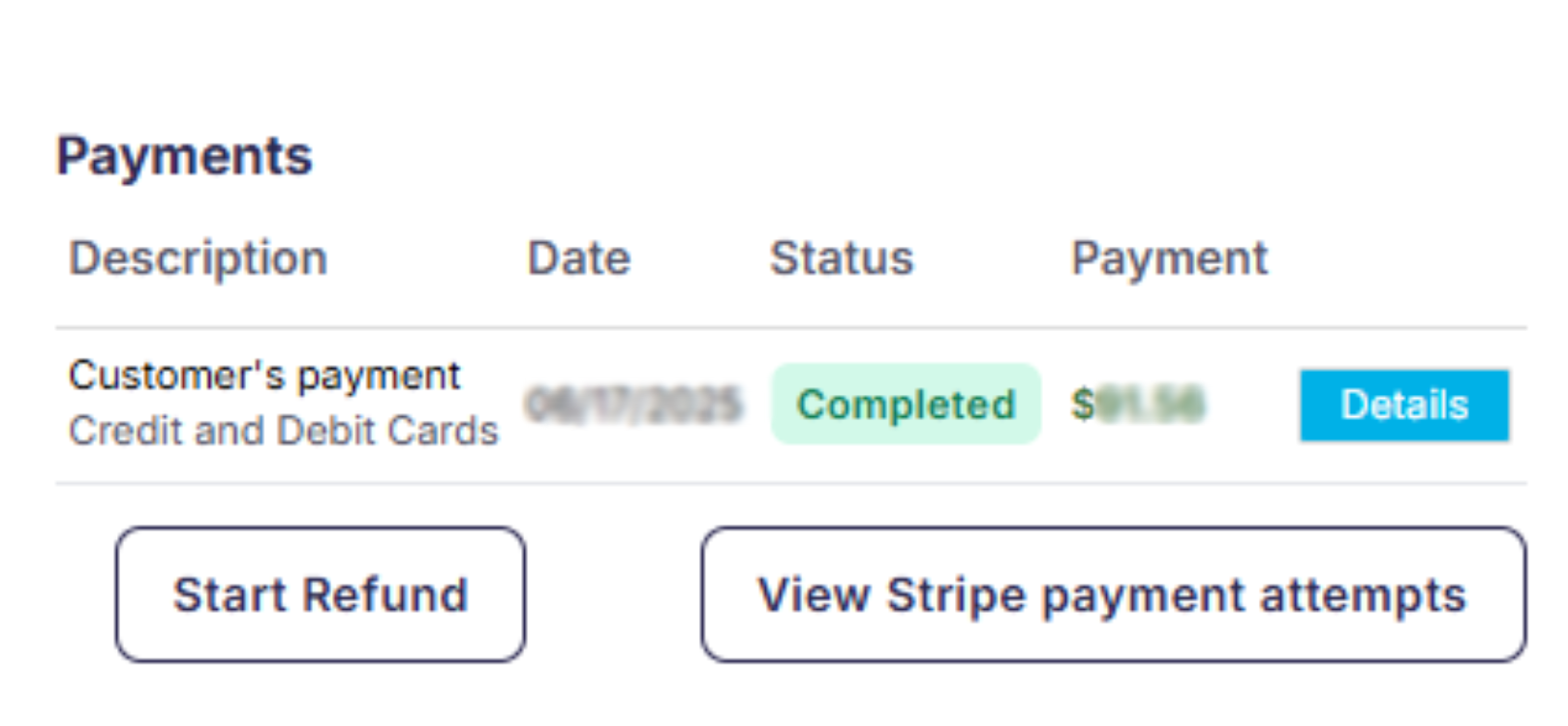
- **Payments:** Enables refund initiation and shows payment attempts. *Clicking does not trigger refund automatically.*
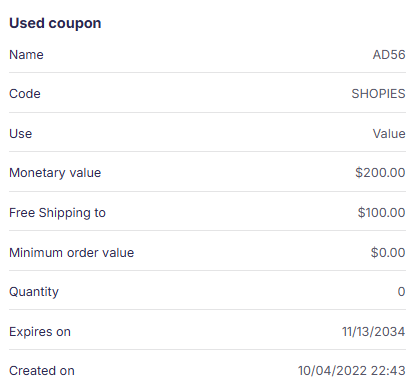
**Coupon:** If used, this section displays its value, terms, and expiration.
### **Top-right actions**
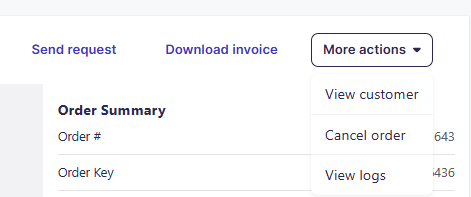
Available actions include:
- **Send request:** [Start a request to the lab or GotPhoto support](https://help.gotphoto.com/en/support/managing-customer-requests-complaints-in-gotphoto?hsLang=en)
- **Download invoice:** Verify items purchased in a package or standalone
- **More actions:**
- **View customer:** Opens customer profile
- **Cancel order:** See [this guide](https://help.gotphoto.com/en/support/cancel-or-change-an-order?hsLang=en) for best practices
- **Access logs:** View order logs to troubleshoot issues
### **The takeaway**
The redesigned order details page provides faster access to key order actions, summaries, and workflows. Use the left panel to manage content, the right panel to view order status and summary, and the top-right to take specific actions.
- [Getting Started](https://help.gotphoto.com/en/support/getting-started?hsLang=en#main-content)
- [One-Time Settings](https://help.gotphoto.com/en/support/getting-started?hsLang=en#one-time-settings)
- [Price Lists and Product Packages](https://help.gotphoto.com/en/support/getting-started?hsLang=en#price-lists-and-product-packages)
- [Your Online Shop](https://help.gotphoto.com/en/support/getting-started?hsLang=en#your-online-shop)
- [Communication With Customers](https://help.gotphoto.com/en/support/getting-started?hsLang=en#communication-with-customers)
- [Upselling Options](https://help.gotphoto.com/en/support/getting-started?hsLang=en#upselling-options)
- [Navigation](https://help.gotphoto.com/en/support/getting-started?hsLang=en#navigation)
- [How-To's](https://help.gotphoto.com/en/support/how-tos?hsLang=en#main-content)
- [Review Phase](https://help.gotphoto.com/en/support/how-tos?hsLang=en#review-phase)
- [Sales Phase](https://help.gotphoto.com/en/support/how-tos?hsLang=en#sales-phase)
- [Workflow Guides for Specific Scenarios](https://help.gotphoto.com/en/support/how-tos?hsLang=en#workflow-guides-for-specific-scenarios)
- [Planning Phase](https://help.gotphoto.com/en/support/how-tos?hsLang=en#planning-phase)
- [Picture Day Phase](https://help.gotphoto.com/en/support/how-tos?hsLang=en#picture-day-phase)
- [Manage your Account](https://help.gotphoto.com/en/support/how-tos?hsLang=en#manage-your-account)
- [GotPhoto's Editing Services](https://help.gotphoto.com/en/support/gotphotos-editing-services?hsLang=en#main-content)
- [GotPhoto's Editing Services](https://help.gotphoto.com/en/support/gotphotos-editing-services?hsLang=en#gotphotos-editing-services)
- [Sports Graphics Creation Service by Next Gen](https://help.gotphoto.com/en/support/sports-graphics-creation-service-by-next-gen?hsLang=en#main-content)
- [Next Gen](https://help.gotphoto.com/en/support/sports-graphics-creation-service-by-next-gen?hsLang=en#next-gen)
- [Entagged & GotPhoto Tagging App](https://help.gotphoto.com/en/support/entagged-gotphoto-tagging-app?hsLang=en#main-content)
- [Master Entagged with Comprehensive Tutorials.](https://help.gotphoto.com/en/support/entagged-gotphoto-tagging-app?hsLang=en#master-entagged-with-comprehensive-tutorials)
- [Entagged Troubleshooting](https://help.gotphoto.com/en/support/entagged-gotphoto-tagging-app?hsLang=en#entagged-troubleshooting)
- [GotPhoto Tagging App](https://help.gotphoto.com/en/support/entagged-gotphoto-tagging-app?hsLang=en#gotphoto-tagging-app)
- [Business & Growth](https://help.gotphoto.com/en/support/business-growth?hsLang=en#main-content)
- [Stripe & Accounting Resources](https://help.gotphoto.com/en/support/business-growth?hsLang=en#stripe-accounting-resources)
- [Best practices](https://help.gotphoto.com/en/support/business-growth?hsLang=en#best-practices)
- [Webinars](https://help.gotphoto.com/en/support/business-growth?hsLang=en#webinars)
- [Templates and Downloads](https://help.gotphoto.com/en/support/business-growth?hsLang=en#templates-and-downloads)
- [GotPhoto Referral Program](https://help.gotphoto.com/en/support/business-growth?hsLang=en#gotphoto-referral-program)
- [UK Materials](https://help.gotphoto.com/en/support/business-growth?hsLang=en#uk-materials)
- [Troubleshooting](https://help.gotphoto.com/en/support/troubleshooting?hsLang=en#main-content)
- [Uploading Photos](https://help.gotphoto.com/en/support/troubleshooting?hsLang=en#uploading-photos)
- [Customer-Facing Issues](https://help.gotphoto.com/en/support/troubleshooting?hsLang=en#customer-facing-issues)
- [Access Codes](https://help.gotphoto.com/en/support/troubleshooting?hsLang=en#access-codes)
- [Managing Names Lists](https://help.gotphoto.com/en/support/troubleshooting?hsLang=en#managing-names-lists)
- [Customer Outreach](https://help.gotphoto.com/en/support/troubleshooting?hsLang=en#customer-outreach)
- [Customizing Your Shop](https://help.gotphoto.com/en/support/troubleshooting?hsLang=en#customizing-your-shop)
- [Your Account](https://help.gotphoto.com/en/support/troubleshooting?hsLang=en#your-account)
- [Price Lists](https://help.gotphoto.com/en/support/troubleshooting?hsLang=en#price-lists)
- [Student Data Export](https://help.gotphoto.com/en/support/troubleshooting?hsLang=en#student-data-export)
- [DIY Sports Graphic Creation & Group Composites](https://help.gotphoto.com/en/support/diy-sports-graphic-creation-group-composites?hsLang=en#main-content)
- [Workflow Resources: QSuite, Pixnub & Team Photo Composite](https://help.gotphoto.com/en/support/diy-sports-graphic-creation-group-composites?hsLang=en#workflow-resources-qsuite-pixnub-team-photo-composite)
- [GotPhoto North America](https://www.gotphoto.com/)
- [T&Cs US](https://www.gotphoto.com/gtc-us/)
- [T&Cs Canada](https://www.gotphoto.com/gtc-ca/)
- [Privacy Policy US](https://www.gotphoto.com/data-privacy-policy-us/)
- [Privacy Policy Canada](https://www.gotphoto.com/data-privacy-policy-ca/)
- [DPA US](https://www.gotphoto.com/dpa-us/)
- [DPA Canada](https://www.gotphoto.com/dpa-ca/)
- [TOMs & sub-processors US](https://www.gotphoto.com/toms-and-sub-processors-us/)
- [TOMs & sub-processors Canada](https://www.gotphoto.com/toms-and-sub-processors-ca/)
- [GotPhoto UK](https://www.gotphoto.co.uk/)
- [T&C UK](https://www.gotphoto.co.uk/gtc/)
- [Privacy Policy UK](https://www.gotphoto.co.uk/data-privacy-policy/)
- [DPA UK](https://www.gotphoto.co.uk/dpa/)
- [TOMs & Sub-Processors UK](https://www.gotphoto.co.uk/toms-and-sub-processors/)
- [Cookie Declaration](https://app.gotphoto.com/cookie_declaration)
[](http://GotPhoto.com)
### GotPhoto North America
**Customer Care**
 +1 646-362-5100
 +1 365-809-1810
SupportUS@gotphoto.com
Support Hours:
Monday – Friday
9am – 7pm ET
### GotPhoto UK
**Customer Care**
+44 (0) 20 8068 8571
service@gotphoto.co.uk
Support Hours:
Monday – Friday
9am – 5pm GMT
Copyright © 2026, GotPhoto Inc.