


Table of contents
- Overview
- Overview
- Sign up with GotPhoto
- Understand your finances with GotPhoto
- Billing system comparison
- Invoice sample: Invoice-based billing (new)
- Lab options
- Sales tax settings
- Language settings
- GotPhoto support
- The takeaway
Overview
This article outlines everything Canadian photographers need to know when getting started with GotPhoto. While most system settings match the U.S. dashboard, this guide highlights key differences specific to the Canadian market.
Sign up with GotPhoto
To get started, sign up here and select "Canada" from the country dropdown menu.
Understand your finances with GotPhoto
This section explains billing rules and applicable fees for Canadian users.
Applicable fees
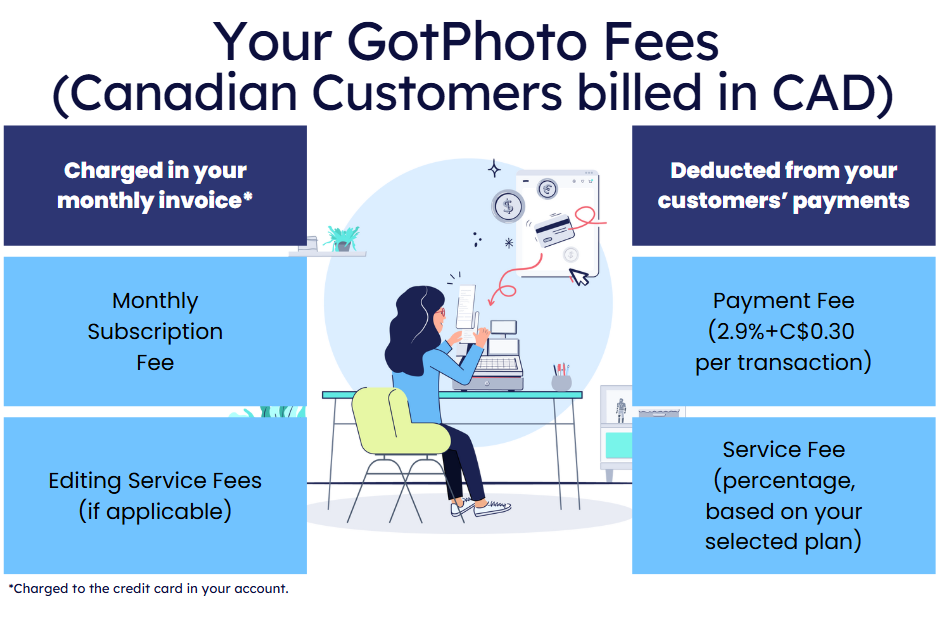
- Monthly or annual subscription fee (not for Enterprise plans).
- Service fee on gross revenue per order (rate depends on your plan).
- Payment processing fee: CAD 0.30 per order + 2.9% transaction fee.
- Editing fees may apply per image.
Billing details
Select the scenario that fits your account:
Your account was created on or after May 14, 2025
- Your customers pay in CAD.
- You are billed in CAD.
Payment and Service fees are deducted automatically from customer payments via Stripe. Your monthly invoice includes any applicable subscription fee and a detailed fee summary per order.
View available plans or compare pricing.
Your account was created before May 14, 2025
- Customers pay in CAD.
- GotPhoto fees are billed in USD (converted using the daily exchange rate).

What's next?
All Canadian billing will transition to CAD for clearer invoicing and stable pricing. We will provide more information on the migration as soon as it is available.
How USD billing currently works
Fees calculated in CAD are converted to USD using the daily exchange rate on the billing day.
Example
- Order total: CAD 43.69
- Service fee: 10% = CAD 4.37
- Exchange rate: 1 CAD = 0.7238 USD
- Converted fee = USD 3.16
You’ll receive your GotPhoto invoices via email, and you can also access them in your GotPhoto Admin under User Name > My Account > Finances > Financial Reports > Invoices.
Invoices for the previous month are available on the first day of each month.
In March 2026, GotPhoto shifted from a rolling invoice balance to invoice-matching billing.
Previously, outstanding amounts were carried over to the next invoice. To improve reconciliation, we introduced a new system where each invoice is handled individually.
This makes it easy to see which invoices are paid and which remain outstanding.
What are the changes that we introduced?
- If you paid all past invoices, your GotPhoto Balance will indicate that.
- If your account has unpaid legacy invoices from the previous billing system, we will display them in your Invoices section where you can pay your legacy balance (to get there, click your username on the upper right of your dashboard > Finances> Invoices).
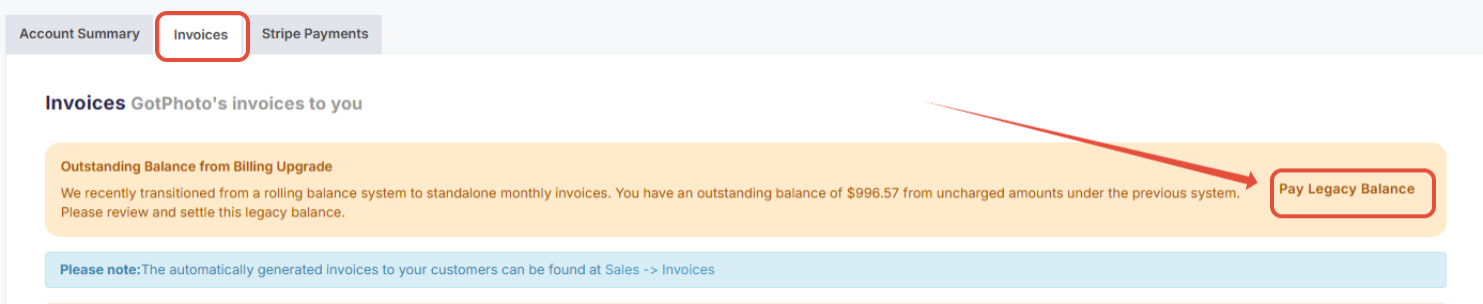
If you have not saved a credit card yet, please do so.
Billing system comparison
| Feature | Legacy (Rolling Balance Billing) | New (Invoice-Based Billing) |
|---|---|---|
| How charges are handled | Balances can carry over between billing periods | Each invoice reflects a specific billing period only |
| How payments work | Outstanding amounts may appear on the next invoice | Each unpaid invoice must be paid separately |
| Best way to identify it | You see carried-over balances on the invoice | You see individual unpaid invoices in GotPhoto Balance |
| Who uses it | - | All customers (introduced in Spring 2026) |
Invoice sample: Invoice-based billing (new)
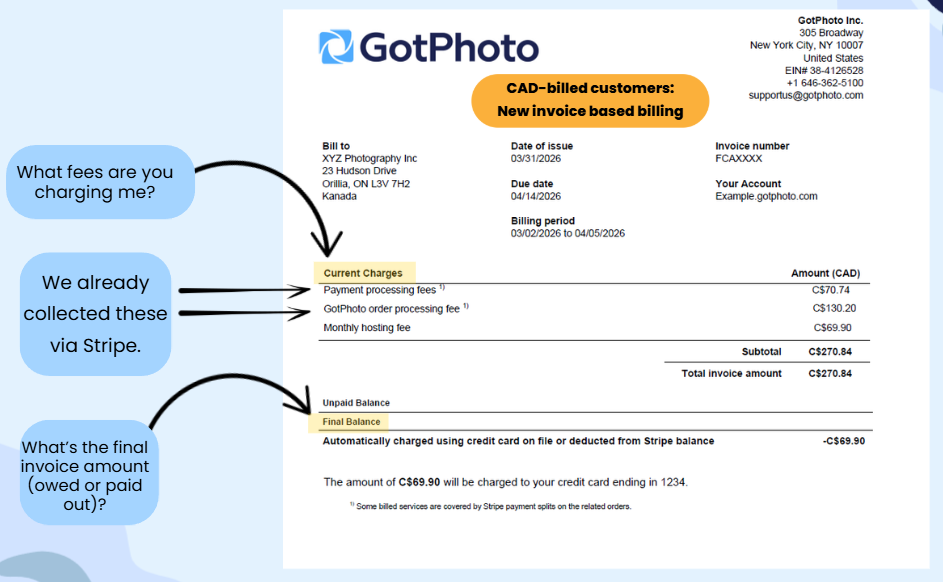
For new customers and migrated existing accounts. Each invoice reflects only the charges for that specific billing period.
1. Customers billed in CAD:
2. Customers billed in USD:
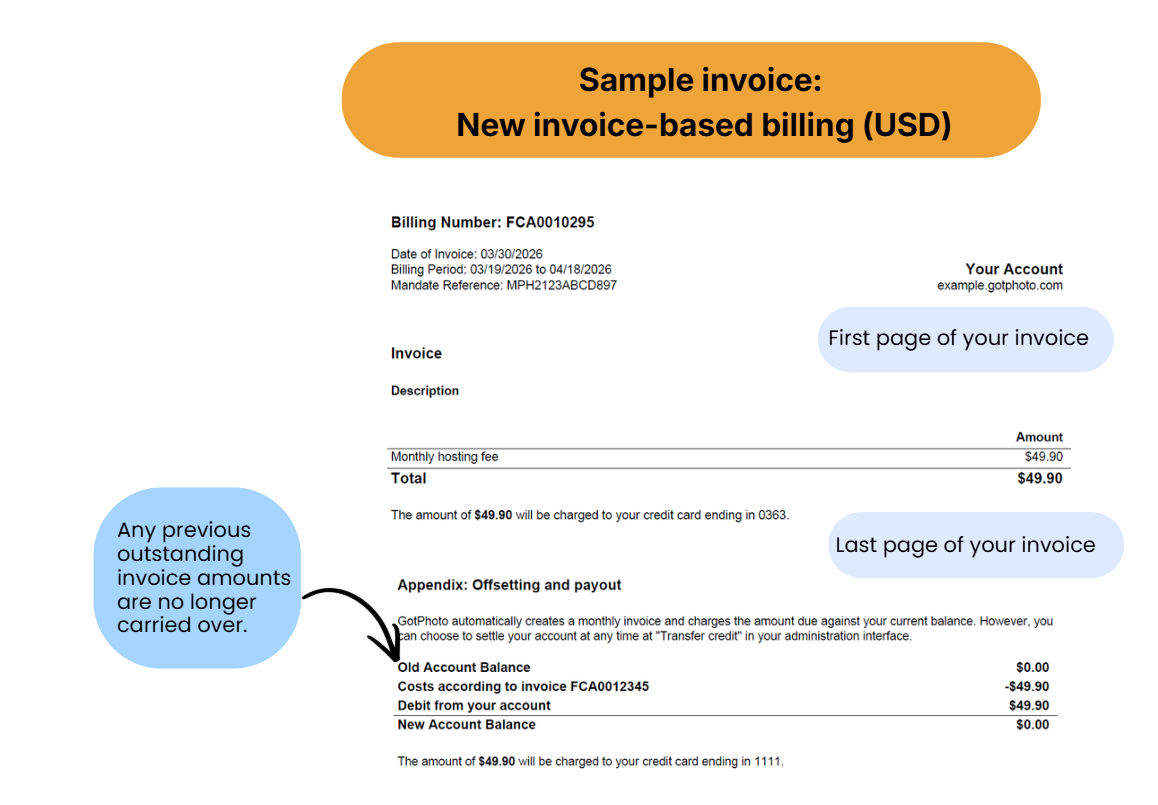
Difference for CAD billed customers and USD billed customers:
CAD customers: Payments and GotPhoto fees are collected via Stripe.
USD customers: Payments and GotPhoto fees are included in your monthly invoice.
- Monthly hosting fees
- This includes your monthly subscription (Your GotPhoto Plan: Free, Growth, and Pro), if applicable. If you're on an annual plan, the annual fee is charged in the month following the activation of the annual plan.
This section can also include Editing Fees, Order Entry fees under 50 USD/CAD, and/or Entagged subscription fees if you utilize any of these services.
Lab options
To explore our Canadian lab partners, visit your lab settings page. Interested in GTA Imaging? Learn more about GTA or contact Customer Care to activate.
Sales tax settings
Set up your Canadian tax rates with help from this GotPhoto tax guide.
Language settings
You can offer your online shop in English and French. Update language preferences in your Online Shop settings.
To enable French:
- Enable French in your shop settings.
- Add French translations for package names and descriptions.


Admin area and automated campaigns
- You can switch the admin UI language at the bottom left of your dashboard.
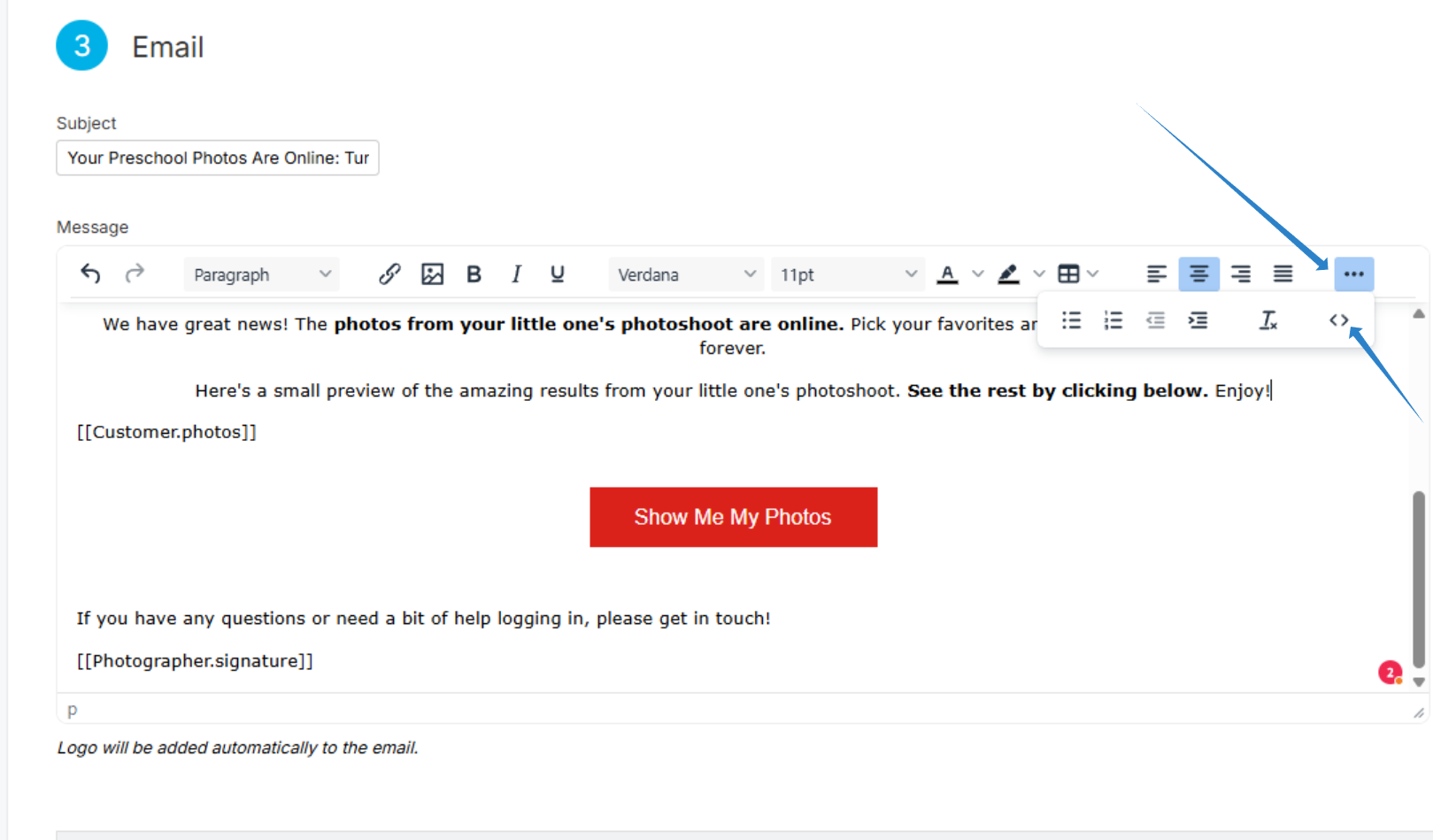
- Automated campaigns are preloaded in English. You can copy the source code and translate using an AI tool, then paste it into a new French campaign.
GotPhoto support
Explore our support options.
The takeaway
Canadian photographers benefit from improved billing transparency, flexible plan options, an interface that is supported in English and French, and clear next steps for CAD invoicing. Customize your shop, labs, and automated campaigns to deliver a localized experience.
Related articles