
Table of Contents
- Overview
- The wishlist in the new shop
- The wishlist in the legacy shop
- Add photos to a wish list
- View and access the wish list
- Actions customers can take
- Collaboration mode
- FAQ
- The takeaway
Overview
Your customers can create a wish list of their favorite photos. This lets students choose their favorites to share with parents, and parents can send their selections to loved ones for input on purchases.
Please note: The wish list feature is not yet available in the New GotPhoto Shop Design, but it will be available very soon.
The wishlist in the new shop (now available upon request)
Shop view in the new shop
Customers can heart images to add them to their wishlist. In this first version, wishlists are only supported in the À la Carte section of the shop.
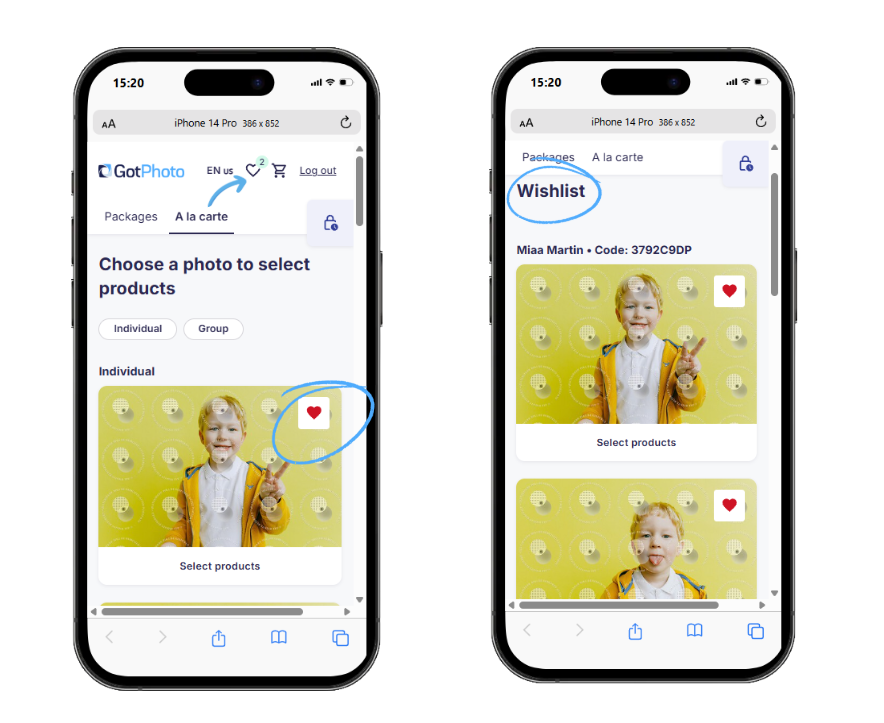
Actions customers can take
- Customers can add images to their wishlist and remove them again at any time.
- Customers can shop directly from the wishlist (À la Carte items only).
The wishlist in the legacy shop
Add photos to a wish list
In the À la Carte / Individual Products section of the shop, customers can click the heart
under a photo to add it to their wish list.

Photos added to the wish list appear at the top when selecting images for packages.
Please note: When shopping across multiple jobs, the wish list only applies to à la carte items.
View and access the wish list
Customers can access their wish list by clicking the heart icon at the top of the shop page.

Actions customers can take
On the wish list page, customers can:
- Remove a photo by clicking X.
- Shop à la carte using only wish list photos.
- Share the wish list with others for input.
- Save the wish list for later (requires providing contact information). After sign-in, wish lists save automatically.
- Delete the wish list to start fresh.
- Create multiple wish lists (e.g., one for student choices and another for grandparents).

Collaboration mode
Signed-in customers can enable Collaboration Mode to let others edit the wish list.

FAQ
Can I access my customer’s wishlist?
No, but customers can use Collaboration Mode to share the list with you via email.
Is the wishlist now fully supported in the new shop?
The first version of the wishlist - which is now available upon request - is now available for individual products. Please note that the following features are not yet available in the new shop and are planned for future updates:
- Support for packages
- Shared wishlists
- Saving wishlists for later for signed-out customers
- Deleting an entire wishlist
- Creating multiple wishlists
The takeaway
The wish list feature helps families and loved ones collaborate on photo selections. Customers can add, share, and manage multiple lists, with collaboration available for signed-in users.