---
title: Photograph GotPhoto QR codes for best recognition
description: It's important to take your QR code pictures in a way that makes sure the system can read them easily.
---
[Skip to content](https://help.gotphoto.com/en/support/photograph-gotphoto-qr-codes-for-best-recognition#main-content)
- [English](https://help.gotphoto.com/en/support/photograph-gotphoto-qr-codes-for-best-recognition)
- [Deutsch – Deutschland](https://help.gotphoto.com/de-de/support/qr-codes-fotografieren-unsere-tipps-fur-beste-resultate)
English
Show submenu for translations

Open main navigation
Close main navigation
- - [English](https://help.gotphoto.com/en/support/photograph-gotphoto-qr-codes-for-best-recognition)
- [Deutsch – Deutschland](https://help.gotphoto.com/de-de/support/qr-codes-fotografieren-unsere-tipps-fur-beste-resultate)
English
Show submenu for translations
Hello. How can we help you?
- There are no suggestions because the search field is empty.
1. [Help Center](https://help.gotphoto.com/en/support?hsLang=en)
2. [How-To's](https://help.gotphoto.com/en/support/how-tos?hsLang=en)
3. [Picture Day Phase](https://help.gotphoto.com/en/support/how-tos?hsLang=en#picture-day-phase)
September 1, 2026
# Photograph GotPhoto QR codes for best recognition
**Table of contents**
- [Overview](https://help.gotphoto.com/en/support/photograph-gotphoto-qr-codes-for-best-recognition#Overview)
- [Shooting guidelines](https://help.gotphoto.com/en/support/photograph-gotphoto-qr-codes-for-best-recognition#Shooting-guidelines)
- [Failed recognition](https://help.gotphoto.com/en/support/photograph-gotphoto-qr-codes-for-best-recognition#Failed-recognition)
- [FAQs](https://help.gotphoto.com/en/support/photograph-gotphoto-qr-codes-for-best-recognition#FAQs)
- [The takeaway](https://help.gotphoto.com/en/support/photograph-gotphoto-qr-codes-for-best-recognition#The-takeaway)
### **Overview**
GotPhoto's QR code system helps keep your photo jobs organized, but only if the codes are photographed correctly. This article explains how to take clear, readable QR code photos and avoid common mistakes that interfere with code recognition.
---
### **Shooting guidelines**
To ensure GotPhoto can successfully read your QR codes, follow these three golden rules:
1. **The card should be flat.**
2. **The photo should be evenly lit.**
3. **The code should be in focus.**
If you meet these criteria, the GotPhoto system can reliably recognize your QR codes.
### **Additional tips for better recognition**
- Size: Recognition is based on a scaled 1200px image. The QR code should be large enough that its dots are still clearly visible.
*Recommendation**:*** QR code should be at least 15% of the image edge length (or 2% of the image area). Take close-up shots so names, access codes, and handwritten notes remain legible.
- Positioning: Use a clipboard to keep the QR card flat.
- Siblings/Buddy shots: GotPhoto supports up to 5 QR codes in one image. Make sure all codes are flat, well-lit, and in focus.
See our [guide to sibling and buddy shots](https://help.gotphoto.com/en/support/manage-sibling-and-buddy-photo-workflows-in-gotphoto?hsLang=en).
- Backlighting: Avoid backlighting the QR card when holding it by hand. It can render the code unreadable.
---
### **Failed recognition**
**Based on extensive testing, these are the most common issues that prevent QR code recognition:**
| **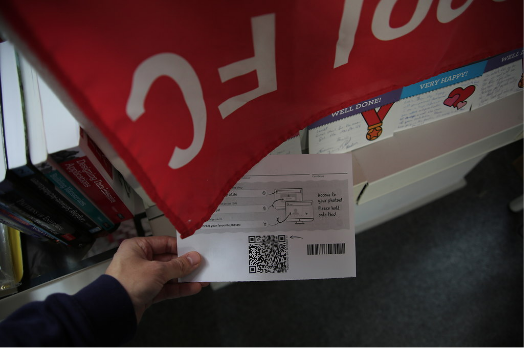** | **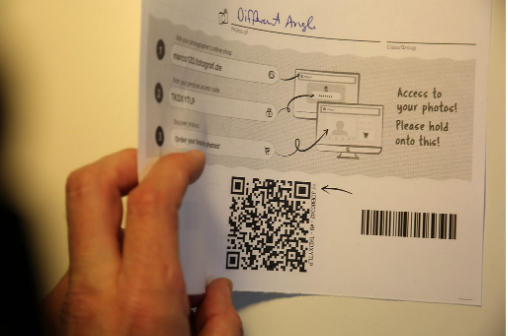** | **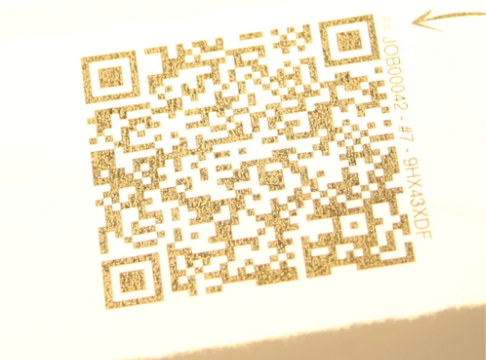** |
| --- | --- | --- |
| ***Uneven exposure or shadows*** | ***Bent or folded paper*** | ***Glare on black sections*** |
| **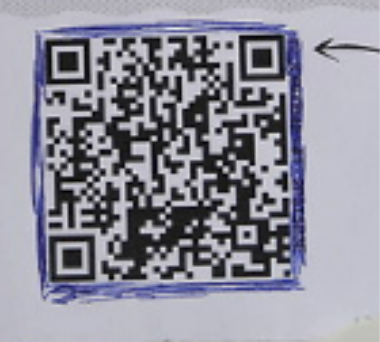** | **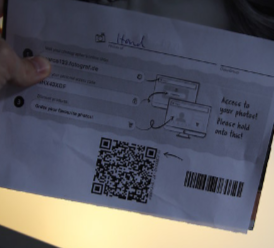** | **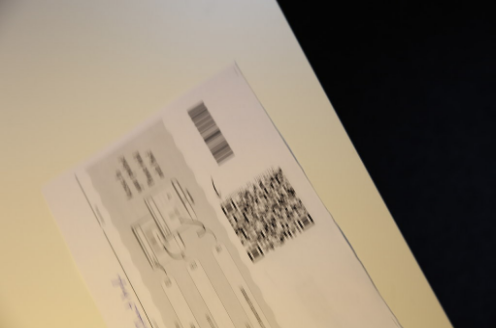** |
| ***No white border*** | ***Backlit image*** | ***Motion blur or wrong focus*** |
| **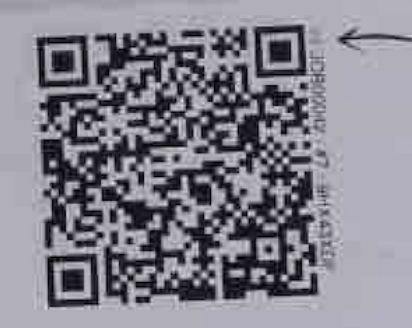 *Small code with high JPG compression*** | | |
---
### **FAQs**
### **Can I include more than one QR code in a photo?**
Yes. The GotPhoto system supports up to 5 QR codes per image. Just ensure all of them are well-lit, in focus, and not distorted.
### **What’s the ideal distance or size for QR code photos?**
QR codes should occupy at least 15% of the photo’s edge length (or 2% of the area). Always ensure dots in the QR are readable at 1200px resolution.
---
### **The takeaway**
Maximize the effectiveness of GotPhoto's QR code system by following three key rules: keep the card flat, ensure even lighting, and focus the image. Avoid the common mistakes shown above to guarantee accurate recognition and keep your workflow running smoothly.
---
- [Getting Started](https://help.gotphoto.com/en/support/getting-started?hsLang=en#main-content)
- [One-Time Settings](https://help.gotphoto.com/en/support/getting-started?hsLang=en#one-time-settings)
- [Price Lists and Product Packages](https://help.gotphoto.com/en/support/getting-started?hsLang=en#price-lists-and-product-packages)
- [Your Online Shop](https://help.gotphoto.com/en/support/getting-started?hsLang=en#your-online-shop)
- [Communication With Customers](https://help.gotphoto.com/en/support/getting-started?hsLang=en#communication-with-customers)
- [Upselling Options](https://help.gotphoto.com/en/support/getting-started?hsLang=en#upselling-options)
- [Navigation](https://help.gotphoto.com/en/support/getting-started?hsLang=en#navigation)
- [How-To's](https://help.gotphoto.com/en/support/how-tos?hsLang=en#main-content)
- [Review Phase](https://help.gotphoto.com/en/support/how-tos?hsLang=en#review-phase)
- [Sales Phase](https://help.gotphoto.com/en/support/how-tos?hsLang=en#sales-phase)
- [Workflow Guides for Specific Scenarios](https://help.gotphoto.com/en/support/how-tos?hsLang=en#workflow-guides-for-specific-scenarios)
- [Planning Phase](https://help.gotphoto.com/en/support/how-tos?hsLang=en#planning-phase)
- [Picture Day Phase](https://help.gotphoto.com/en/support/how-tos?hsLang=en#picture-day-phase)
- [Manage your Account](https://help.gotphoto.com/en/support/how-tos?hsLang=en#manage-your-account)
- [GotPhoto's Editing Services](https://help.gotphoto.com/en/support/gotphotos-editing-services?hsLang=en#main-content)
- [GotPhoto's Editing Services](https://help.gotphoto.com/en/support/gotphotos-editing-services?hsLang=en#gotphotos-editing-services)
- [Sports Graphics Creation Service by Next Gen](https://help.gotphoto.com/en/support/sports-graphics-creation-service-by-next-gen?hsLang=en#main-content)
- [Next Gen](https://help.gotphoto.com/en/support/sports-graphics-creation-service-by-next-gen?hsLang=en#next-gen)
- [Entagged & GotPhoto Tagging App](https://help.gotphoto.com/en/support/entagged-gotphoto-tagging-app?hsLang=en#main-content)
- [Master Entagged with Comprehensive Tutorials.](https://help.gotphoto.com/en/support/entagged-gotphoto-tagging-app?hsLang=en#master-entagged-with-comprehensive-tutorials)
- [Entagged Troubleshooting](https://help.gotphoto.com/en/support/entagged-gotphoto-tagging-app?hsLang=en#entagged-troubleshooting)
- [GotPhoto Tagging App](https://help.gotphoto.com/en/support/entagged-gotphoto-tagging-app?hsLang=en#gotphoto-tagging-app)
- [Business & Growth](https://help.gotphoto.com/en/support/business-growth?hsLang=en#main-content)
- [Stripe & Accounting Resources](https://help.gotphoto.com/en/support/business-growth?hsLang=en#stripe-accounting-resources)
- [Best practices](https://help.gotphoto.com/en/support/business-growth?hsLang=en#best-practices)
- [Webinars](https://help.gotphoto.com/en/support/business-growth?hsLang=en#webinars)
- [Templates and Downloads](https://help.gotphoto.com/en/support/business-growth?hsLang=en#templates-and-downloads)
- [GotPhoto Referral Program](https://help.gotphoto.com/en/support/business-growth?hsLang=en#gotphoto-referral-program)
- [UK Materials](https://help.gotphoto.com/en/support/business-growth?hsLang=en#uk-materials)
- [Troubleshooting](https://help.gotphoto.com/en/support/troubleshooting?hsLang=en#main-content)
- [Uploading Photos](https://help.gotphoto.com/en/support/troubleshooting?hsLang=en#uploading-photos)
- [Customer-Facing Issues](https://help.gotphoto.com/en/support/troubleshooting?hsLang=en#customer-facing-issues)
- [Access Codes](https://help.gotphoto.com/en/support/troubleshooting?hsLang=en#access-codes)
- [Managing Names Lists](https://help.gotphoto.com/en/support/troubleshooting?hsLang=en#managing-names-lists)
- [Customer Outreach](https://help.gotphoto.com/en/support/troubleshooting?hsLang=en#customer-outreach)
- [Customizing Your Shop](https://help.gotphoto.com/en/support/troubleshooting?hsLang=en#customizing-your-shop)
- [Your Account](https://help.gotphoto.com/en/support/troubleshooting?hsLang=en#your-account)
- [Price Lists](https://help.gotphoto.com/en/support/troubleshooting?hsLang=en#price-lists)
- [Student Data Export](https://help.gotphoto.com/en/support/troubleshooting?hsLang=en#student-data-export)
- [DIY Sports Graphic Creation & Group Composites](https://help.gotphoto.com/en/support/diy-sports-graphic-creation-group-composites?hsLang=en#main-content)
- [Workflow Resources: QSuite, Pixnub & Team Photo Composite](https://help.gotphoto.com/en/support/diy-sports-graphic-creation-group-composites?hsLang=en#workflow-resources-qsuite-pixnub-team-photo-composite)
- [GotPhoto North America](https://www.gotphoto.com/)
- [T&Cs US](https://www.gotphoto.com/gtc-us/)
- [T&Cs Canada](https://www.gotphoto.com/gtc-ca/)
- [Privacy Policy US](https://www.gotphoto.com/data-privacy-policy-us/)
- [Privacy Policy Canada](https://www.gotphoto.com/data-privacy-policy-ca/)
- [DPA US](https://www.gotphoto.com/dpa-us/)
- [DPA Canada](https://www.gotphoto.com/dpa-ca/)
- [TOMs & sub-processors US](https://www.gotphoto.com/toms-and-sub-processors-us/)
- [TOMs & sub-processors Canada](https://www.gotphoto.com/toms-and-sub-processors-ca/)
- [GotPhoto UK](https://www.gotphoto.co.uk/)
- [T&C UK](https://www.gotphoto.co.uk/gtc/)
- [Privacy Policy UK](https://www.gotphoto.co.uk/data-privacy-policy/)
- [DPA UK](https://www.gotphoto.co.uk/dpa/)
- [TOMs & Sub-Processors UK](https://www.gotphoto.co.uk/toms-and-sub-processors/)
- [Cookie Declaration](https://app.gotphoto.com/cookie_declaration)
[](http://GotPhoto.com)
### GotPhoto North America
**Customer Care**
 +1 646-362-5100
 +1 365-809-1810
SupportUS@gotphoto.com
Support Hours:
Monday – Friday
9am – 7pm ET
### GotPhoto UK
**Customer Care**
+44 (0) 20 8068 8571
service@gotphoto.co.uk
Support Hours:
Monday – Friday
9am – 5pm GMT
Copyright © 2026, GotPhoto Inc.