---
title: Campaign performance for your automated email campaigns
description: Campaign performance for your automated email campaigns
---
[Skip to content](https://help.gotphoto.com/en/support/campaign-performance-for-your-automated-email-campaigns#main-content)
- [English](https://help.gotphoto.com/en/support/campaign-performance-for-your-automated-email-campaigns)
- [Deutsch – Deutschland](https://help.gotphoto.com/de-de/support/das-neue-kampagnenperformance-dashboard)
English
Show submenu for translations

Open main navigation
Close main navigation
- - [English](https://help.gotphoto.com/en/support/campaign-performance-for-your-automated-email-campaigns)
- [Deutsch – Deutschland](https://help.gotphoto.com/de-de/support/das-neue-kampagnenperformance-dashboard)
English
Show submenu for translations
Hello. How can we help you?
- There are no suggestions because the search field is empty.
1. [Help Center](https://help.gotphoto.com/en/support?hsLang=en)
2. [How-To's](https://help.gotphoto.com/en/support/how-tos?hsLang=en)
3. [Sales Phase](https://help.gotphoto.com/en/support/how-tos?hsLang=en#sales-phase)
September 29, 2026
# Campaign performance for your automated email campaigns
### **Overview**
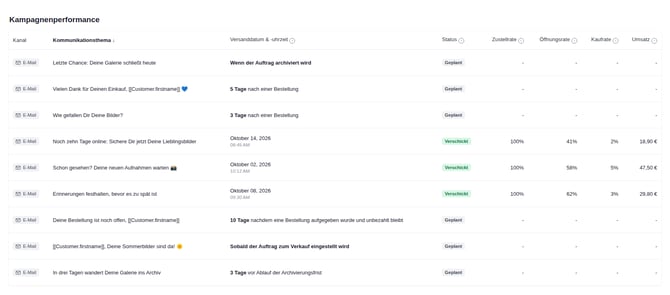
The campaign performance section shows how the notifications in your automated campaigns perform, whether they were sent via email or SMS \[US/CA\]. For email notifications, you see the status, delivery rate, open rate, buy rate, and gross revenue. For SMS notifications, you see the status and delivery rate. This lets you evaluate your automated campaigns directly in the GotPhoto platform.
**What’s new:**
- See whether each automated campaign notification was sent via SMS or email in the new **Channel** column.
- Track SMS status and delivery rate.
- Open rate, buy rate, and revenue for SMS will be added in the next iteration of this feature.
**Location of the feature**
You can find the campaign performance section in the **Communications** tab within your GotPhoto photo job.

### **Understand the key metrics**
The campaign performance table shows one row per notification in your automated campaign, with metrics that measure how effective each notification is.
#### **Metrics for emails and SMS**
Email notifications show the full set of metrics. SMS notifications currently show status and delivery rate. Open rate, buy rate, and revenue for SMS follow in the next iteration.
#### **Metric definitions**
Each column in the table measures a different step between sending a notification and receiving an order.
- **New: Channel**: Shows whether the notification was sent via *Email* or *SMS*.
- **Status**: Shows whether a notification is *Planned*, *In Progress*, or *Sent*.
- **Delivery rate**: The percentage of eligible customers that GotPhoto successfully sent the notification to. Eligible customers are the customers who meet the conditions of the notification, for example customers with photos in the photo job. The delivery rate shows successful sending. It does not confirm that the notification reached the customer’s inbox or phone.
- **Email:** Eligible customers always have an email address, so the rate is typically 100%. Bounced emails count as sent. A rate below 100% points to a sending issue on GotPhoto’s side.
- **SMS:** GotPhoto can only send an SMS to customers with a phone number. Eligible customers without a phone number lower the SMS delivery rate.
- **Open rate**: The percentage of delivered emails that recipients opened. A low open rate can point to unengaging subject lines, poor timing, or spam filter issues. *Available for SMS in the next iteration.*
- **Buy rate**: The percentage of delivered emails that led to a purchase after the customer clicked through. *Note: If a buyer later cancels the order or receives a refund, this does not affect the buy rate or the buyer status. Available for SMS in the next iteration.*
- **Revenue**: The total sales (incl. sales tax) generated from customers who clicked through the email and placed an order. *Note: The total revenue does not change, even if the order amount is partially or fully refunded later. Available for SMS in the next iteration.*
### **How to improve each key metric**
Use this guide when a metric in your automated campaign looks low. Each metric reflects a different step in the customer journey.
#### **Delivery rate**
**What it means:** The percentage of eligible customers that GotPhoto successfully sent the email or SMS to.
**Email:** A rate below 100% points to a temporary sending issue on our side. No action is required from you.
**SMS:** A rate below 100% usually means that some customers in the photo job have no phone number saved. To reach more customers via SMS:
- Make sure as many customers as possible have a phone number saved.
- Check that saved phone numbers are complete and correct.
#### **Open rate**
**What it means:** How many people opened your delivered emails.
**If it’s low:**
- Use clear, friendly subject lines, for example “Your child’s photos are ready”.
- Send at popular times (morning or evening).
- Keep bounce rates low to avoid spam filters.
- Avoid overwhelming parents with too many emails.
- Use a recognizable [sender name](https://help.gotphoto.com/en/support/the-communication-settings-pages?hsLang=en), such as your studio name.
#### **Buy rate**
**What it means:** The percentage of customers who successfully received the email, clicked a link, and then placed at least one order.
**Example:** If your email has an 80% delivery rate, the buy rate is calculated only from the successfully delivered emails. It measures how many recipients clicked a link and went on to place at least one order.
**If it’s low:**
- Add a clear call-to-action, such as “View photos” or “Order now”.
- Avoid text-heavy messages. Parents prefer short messages that get to the point.
- Match reminder timings to discount deadlines.
- Include a variety of poses and expressions so families have a choice.
- Review pricing and bundles to improve value.
- Keep pricing simple and easy to understand.
- Offer the [add-on retouching](https://help.gotphoto.com/en/support/offer-the-professional-retouching-add-on-in-gotphoto?hsLang=en).
- Increase motivation and urgency by offering a job coupon, for example “Limited-time offer inside”.
#### **Revenue**
**What it means:** Total sales (incl. sales tax) generated from customers who clicked through the email.
**If it’s low:**
- Offer value bundles or premium add-ons.
- [Use discounts strategically](https://help.gotphoto.com/en/support/offer-a-job-coupon#:~:text=In%20the%20following%20example).
- Show helpful upsell messages in the shop. Use the [job description](https://help.gotphoto.com/en/support/advanced-job-settings?hsLang=en) to mention seasonal offers.
- Send timely reminders that create urgency.
- Use [upselling options](https://help.gotphoto.com/en/support/set-up-upselling-download-options-in-gotphoto?hsLang=en).
- Offer digital packages. Many families prefer instant access, and digital packages often increase the average order value (AOV).
#### **Pro tip: Think of your campaign as a funnel**
Each metric builds on the previous one, so improving each step raises your overall campaign performance.
- **Delivery**: GotPhoto sends your emails and SMS messages. For SMS, make sure your customers have a correct mobile number saved.
- **Open**: Improve subject lines and timing.
- **Buy**: Strengthen your call-to-action and your offer.
- **Revenue**: Increase order value with appealing packages and upsells.
### **FAQ**
#### **Which types of communications are supported?**
The campaign performance section supports **automated campaign notifications sent via email and SMS**. One-time emails, one-time SMS messages, and abandoned cart emails are not included in the performance data.
#### **When will open rate, buy rate, and revenue be available for SMS?**
These metrics will be added for SMS in the next iteration of the campaign performance section. Until then, SMS notifications show status and delivery rate.
#### **Can one automated campaign include both email and SMS notifications?**
Yes. Each notification appears as its own row, and the **Channel** column shows whether it was sent via email or SMS.
#### **Why is my SMS delivery rate lower than my email delivery rate?**
Every eligible customer has an email address, but not every eligible customer has a phone number. GotPhoto cannot send an SMS to customers without a phone number, and these customers lower the SMS delivery rate. The email delivery rate is typically 100%.
#### **Does the delivery rate show whether a customer received the notification?**
No. The delivery rate shows whether GotPhoto successfully sent the notification. It does not confirm that the notification arrived in the customer’s inbox or on their phone.
#### **Are test messages included in the tracking data?**
No. Test emails and test SMS messages sent to account users are excluded from the performance data.
#### **What conditions affect visibility of the campaign performance section?**
- The section is only visible when an automated campaign is configured for the photo job.
- It tracks automated email and SMS notifications only.
- Updated data can take several hours to appear after notifications are sent.
#### **What do the status indicators mean?**
- **Planned**: The notification is scheduled but has not started sending.
- **In Progress**: The notification is currently being sent to recipients.
- **Sent**: The notification has finished sending. Its position in the list does not change based on its status.
### **Summary**
The campaign performance section shows how your automated email and SMS notifications perform, directly in the GotPhoto platform. The Channel column tells you how each notification was sent. For email, you track delivery rate, open rate, buy rate, and revenue. For SMS, you track status and delivery rate, with open rate, buy rate, and revenue following in the next iteration.
Buy rate and revenue remain unchanged even if an order is partially or fully refunded later, so your performance metrics stay consistent.
- [Getting Started](https://help.gotphoto.com/en/support/getting-started?hsLang=en#main-content)
- [One-Time Settings](https://help.gotphoto.com/en/support/getting-started?hsLang=en#one-time-settings)
- [Price Lists and Product Packages](https://help.gotphoto.com/en/support/getting-started?hsLang=en#price-lists-and-product-packages)
- [Your Online Shop](https://help.gotphoto.com/en/support/getting-started?hsLang=en#your-online-shop)
- [Communication With Customers](https://help.gotphoto.com/en/support/getting-started?hsLang=en#communication-with-customers)
- [Upselling Options](https://help.gotphoto.com/en/support/getting-started?hsLang=en#upselling-options)
- [Navigation](https://help.gotphoto.com/en/support/getting-started?hsLang=en#navigation)
- [How-To's](https://help.gotphoto.com/en/support/how-tos?hsLang=en#main-content)
- [Review Phase](https://help.gotphoto.com/en/support/how-tos?hsLang=en#review-phase)
- [Sales Phase](https://help.gotphoto.com/en/support/how-tos?hsLang=en#sales-phase)
- [Workflow Guides for Specific Scenarios](https://help.gotphoto.com/en/support/how-tos?hsLang=en#workflow-guides-for-specific-scenarios)
- [Planning Phase](https://help.gotphoto.com/en/support/how-tos?hsLang=en#planning-phase)
- [Picture Day Phase](https://help.gotphoto.com/en/support/how-tos?hsLang=en#picture-day-phase)
- [Manage your Account](https://help.gotphoto.com/en/support/how-tos?hsLang=en#manage-your-account)
- [GotPhoto's Editing Services](https://help.gotphoto.com/en/support/gotphotos-editing-services?hsLang=en#main-content)
- [GotPhoto's Editing Services](https://help.gotphoto.com/en/support/gotphotos-editing-services?hsLang=en#gotphotos-editing-services)
- [Sports Graphics Creation Service by Next Gen](https://help.gotphoto.com/en/support/sports-graphics-creation-service-by-next-gen?hsLang=en#main-content)
- [Next Gen](https://help.gotphoto.com/en/support/sports-graphics-creation-service-by-next-gen?hsLang=en#next-gen)
- [Entagged & GotPhoto Tagging App](https://help.gotphoto.com/en/support/entagged-gotphoto-tagging-app?hsLang=en#main-content)
- [Master Entagged with Comprehensive Tutorials.](https://help.gotphoto.com/en/support/entagged-gotphoto-tagging-app?hsLang=en#master-entagged-with-comprehensive-tutorials)
- [Entagged Troubleshooting](https://help.gotphoto.com/en/support/entagged-gotphoto-tagging-app?hsLang=en#entagged-troubleshooting)
- [GotPhoto Tagging App](https://help.gotphoto.com/en/support/entagged-gotphoto-tagging-app?hsLang=en#gotphoto-tagging-app)
- [Business & Growth](https://help.gotphoto.com/en/support/business-growth?hsLang=en#main-content)
- [Stripe & Accounting Resources](https://help.gotphoto.com/en/support/business-growth?hsLang=en#stripe-accounting-resources)
- [Best practices](https://help.gotphoto.com/en/support/business-growth?hsLang=en#best-practices)
- [Webinars](https://help.gotphoto.com/en/support/business-growth?hsLang=en#webinars)
- [Templates and Downloads](https://help.gotphoto.com/en/support/business-growth?hsLang=en#templates-and-downloads)
- [GotPhoto Referral Program](https://help.gotphoto.com/en/support/business-growth?hsLang=en#gotphoto-referral-program)
- [UK Materials](https://help.gotphoto.com/en/support/business-growth?hsLang=en#uk-materials)
- [Troubleshooting](https://help.gotphoto.com/en/support/troubleshooting?hsLang=en#main-content)
- [Uploading Photos](https://help.gotphoto.com/en/support/troubleshooting?hsLang=en#uploading-photos)
- [Customer-Facing Issues](https://help.gotphoto.com/en/support/troubleshooting?hsLang=en#customer-facing-issues)
- [Access Codes](https://help.gotphoto.com/en/support/troubleshooting?hsLang=en#access-codes)
- [Managing Names Lists](https://help.gotphoto.com/en/support/troubleshooting?hsLang=en#managing-names-lists)
- [Customer Outreach](https://help.gotphoto.com/en/support/troubleshooting?hsLang=en#customer-outreach)
- [Customizing Your Shop](https://help.gotphoto.com/en/support/troubleshooting?hsLang=en#customizing-your-shop)
- [Your Account](https://help.gotphoto.com/en/support/troubleshooting?hsLang=en#your-account)
- [Price Lists](https://help.gotphoto.com/en/support/troubleshooting?hsLang=en#price-lists)
- [Student Data Export](https://help.gotphoto.com/en/support/troubleshooting?hsLang=en#student-data-export)
- [DIY Sports Graphic Creation & Group Composites](https://help.gotphoto.com/en/support/diy-sports-graphic-creation-group-composites?hsLang=en#main-content)
- [Workflow Resources: QSuite, Pixnub & Team Photo Composite](https://help.gotphoto.com/en/support/diy-sports-graphic-creation-group-composites?hsLang=en#workflow-resources-qsuite-pixnub-team-photo-composite)
- [GotPhoto North America](https://www.gotphoto.com/)
- [T&Cs US](https://www.gotphoto.com/gtc-us/)
- [T&Cs Canada](https://www.gotphoto.com/gtc-ca/)
- [Privacy Policy US](https://www.gotphoto.com/data-privacy-policy-us/)
- [Privacy Policy Canada](https://www.gotphoto.com/data-privacy-policy-ca/)
- [DPA US](https://www.gotphoto.com/dpa-us/)
- [DPA Canada](https://www.gotphoto.com/dpa-ca/)
- [TOMs & sub-processors US](https://www.gotphoto.com/toms-and-sub-processors-us/)
- [TOMs & sub-processors Canada](https://www.gotphoto.com/toms-and-sub-processors-ca/)
- [GotPhoto UK](https://www.gotphoto.co.uk/)
- [T&C UK](https://www.gotphoto.co.uk/gtc/)
- [Privacy Policy UK](https://www.gotphoto.co.uk/data-privacy-policy/)
- [DPA UK](https://www.gotphoto.co.uk/dpa/)
- [TOMs & Sub-Processors UK](https://www.gotphoto.co.uk/toms-and-sub-processors/)
- [Cookie Declaration](https://app.gotphoto.com/cookie_declaration)
[](http://GotPhoto.com)
### GotPhoto North America
**Customer Care**
 +1 646-362-5100
 +1 365-809-1810
SupportUS@gotphoto.com
Support Hours:
Monday – Friday
9am – 7pm ET
### GotPhoto UK
**Customer Care**
+44 (0) 20 8068 8571
service@gotphoto.co.uk
Support Hours:
Monday – Friday
9am – 5pm GMT
Copyright © 2026, GotPhoto Inc.