---
title: Add additional users to your account
description: Do you work with a partner, team, or staff? Add users to your GotPhoto account for easy collaboration. This feature is available to Enterprise and Pro tier customers.
---
[Skip to content](https://help.gotphoto.com/en/support/add-additional-users-to-your-account#main-content)
- [English](https://help.gotphoto.com/en/support/add-additional-users-to-your-account)
- [Deutsch – Deutschland](https://help.gotphoto.com/de-de/support/zusatzliche-benutzer-zu-deinem-konto-hinzufugen)
English
Show submenu for translations

Open main navigation
Close main navigation
- - [English](https://help.gotphoto.com/en/support/add-additional-users-to-your-account)
- [Deutsch – Deutschland](https://help.gotphoto.com/de-de/support/zusatzliche-benutzer-zu-deinem-konto-hinzufugen)
English
Show submenu for translations
Hello. How can we help you?
- There are no suggestions because the search field is empty.
1. [Help Center](https://help.gotphoto.com/en/support?hsLang=en)
2. [Getting Started](https://help.gotphoto.com/en/support/getting-started?hsLang=en)
3. [One-Time Settings](https://help.gotphoto.com/en/support/getting-started?hsLang=en#one-time-settings)
October 20, 2026
# Add additional users to your account
**Table of contents**
- [Overview](https://help.gotphoto.com/en/support/add-additional-users-to-your-account#Overview)
- [Adding users](https://help.gotphoto.com/en/support/add-additional-users-to-your-account#Adding-users)
- [User rights table](https://help.gotphoto.com/en/support/add-additional-users-to-your-account#User-rights-table)
- [The takeaway](https://help.gotphoto.com/en/support/add-additional-users-to-your-account#The-takeaway)
---
### **Overview**
Do you work with a partner, team, or staff? Add users to your GotPhoto account for easy collaboration. You fully control user access rights and what they can and can't change in the account.
**⚠ Please note:** This feature is available to **\[Enterprise and Pro only\]** customers.
If you're looking for how to grant an organization access to statistics and orders, please refer to this article: [How to create and add organizations to photo jobs in GotPhoto](https://help.gotphoto.com/en/support/how-to-create-and-add-organizations-to-photo-jobs-in-gotphoto?hsLang=en)
---
### **Adding users**
Follow these steps to add new users and define their access level in your account:
1. 1Click on your name in the upper right corner of your admin area and select **My Account**. Then, click on **User Profiles** in the menu on the left.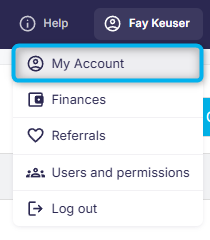
2. 2Review the list of current users, including their access rights and any existing FTP credentials (if you use [FTP transfers](https://help.gotphoto.com/en/support/upload-photos-using-ftp-in-gotphoto?hsLang=en)). 
3. 3Click **+ Add user** in the upper right of the page.
4. 4Complete the **Basic information (required)** section: enter the user’s name, email address, and password. 
5. 5Under **Rights Management (required)**, assign the appropriate user role:
- **Admin:** Full access, same as account owner. Includes job, settings, and user management. 
- **Individual:** Custom access. A dropdown will appear to choose specific permissions. 
- **Upload only:** Limited to uploading photos. You can decide if they can upload to any job or just assigned jobs. They can view all jobs, but cannot upload to unassigned ones. 
6. 6
**Access to settings:** Regardless of role, you can independently enable access to account settings.
7. 7\[Optional\] If you're[using FTP](https://help.gotphoto.com/en/support/upload-photos-using-ftp-in-gotphoto?hsLang=en) to upload photos, tick **Upload photos via FTP**. A dropdown will appear to define the user’s FTP credentials. 
8. 8Click **Save** to finish adding the user.
9. 9Make sure to share the login credentials (email and password) with the new user so they can access the platform or upload photos as needed.
### **User rights table**
The table below shows all available user roles and the permissions assigned to each one\*.
Rows represent specific actions or access areas (such as settings, orders, uploads, or statistics), while columns indicate which roles can perform those actions. Use it as a quick reference when deciding which access level to assign to a team member. Click the table to view an enlarged version.
[](https://help.gotphoto.com/hubfs/gotphoto-migration/AFlmmlTIW89sUcwC2efh-t8T5Dj3_SzZnA.png?hsLang=en)
\*Individual: Can access jobs/jobs assigned to. Upload photos. Create own production tab. Can access and edit job settings and advanced settings. Can't see orders and sales, can send a newsletter from the job.
---
### **The takeaway**
Enhance your team’s collaboration and streamline workflows by adding users to your GotPhoto account. This feature, available to **\[Enterprise and Pro only\]** users, lets you control permissions to match the responsibilities of each team member.
- [Getting Started](https://help.gotphoto.com/en/support/getting-started?hsLang=en#main-content)
- [One-Time Settings](https://help.gotphoto.com/en/support/getting-started?hsLang=en#one-time-settings)
- [Price Lists and Product Packages](https://help.gotphoto.com/en/support/getting-started?hsLang=en#price-lists-and-product-packages)
- [Your Online Shop](https://help.gotphoto.com/en/support/getting-started?hsLang=en#your-online-shop)
- [Communication With Customers](https://help.gotphoto.com/en/support/getting-started?hsLang=en#communication-with-customers)
- [Upselling Options](https://help.gotphoto.com/en/support/getting-started?hsLang=en#upselling-options)
- [Navigation](https://help.gotphoto.com/en/support/getting-started?hsLang=en#navigation)
- [How-To's](https://help.gotphoto.com/en/support/how-tos?hsLang=en#main-content)
- [Review Phase](https://help.gotphoto.com/en/support/how-tos?hsLang=en#review-phase)
- [Sales Phase](https://help.gotphoto.com/en/support/how-tos?hsLang=en#sales-phase)
- [Workflow Guides for Specific Scenarios](https://help.gotphoto.com/en/support/how-tos?hsLang=en#workflow-guides-for-specific-scenarios)
- [Planning Phase](https://help.gotphoto.com/en/support/how-tos?hsLang=en#planning-phase)
- [Picture Day Phase](https://help.gotphoto.com/en/support/how-tos?hsLang=en#picture-day-phase)
- [Manage your Account](https://help.gotphoto.com/en/support/how-tos?hsLang=en#manage-your-account)
- [GotPhoto's Editing Services](https://help.gotphoto.com/en/support/gotphotos-editing-services?hsLang=en#main-content)
- [GotPhoto's Editing Services](https://help.gotphoto.com/en/support/gotphotos-editing-services?hsLang=en#gotphotos-editing-services)
- [Sports Graphics Creation Service by Next Gen](https://help.gotphoto.com/en/support/sports-graphics-creation-service-by-next-gen?hsLang=en#main-content)
- [Next Gen](https://help.gotphoto.com/en/support/sports-graphics-creation-service-by-next-gen?hsLang=en#next-gen)
- [Entagged & GotPhoto Tagging App](https://help.gotphoto.com/en/support/entagged-gotphoto-tagging-app?hsLang=en#main-content)
- [Master Entagged with Comprehensive Tutorials.](https://help.gotphoto.com/en/support/entagged-gotphoto-tagging-app?hsLang=en#master-entagged-with-comprehensive-tutorials)
- [Entagged Troubleshooting](https://help.gotphoto.com/en/support/entagged-gotphoto-tagging-app?hsLang=en#entagged-troubleshooting)
- [GotPhoto Tagging App](https://help.gotphoto.com/en/support/entagged-gotphoto-tagging-app?hsLang=en#gotphoto-tagging-app)
- [Business & Growth](https://help.gotphoto.com/en/support/business-growth?hsLang=en#main-content)
- [Stripe & Accounting Resources](https://help.gotphoto.com/en/support/business-growth?hsLang=en#stripe-accounting-resources)
- [Best practices](https://help.gotphoto.com/en/support/business-growth?hsLang=en#best-practices)
- [Webinars](https://help.gotphoto.com/en/support/business-growth?hsLang=en#webinars)
- [Templates and Downloads](https://help.gotphoto.com/en/support/business-growth?hsLang=en#templates-and-downloads)
- [GotPhoto Referral Program](https://help.gotphoto.com/en/support/business-growth?hsLang=en#gotphoto-referral-program)
- [UK Materials](https://help.gotphoto.com/en/support/business-growth?hsLang=en#uk-materials)
- [Troubleshooting](https://help.gotphoto.com/en/support/troubleshooting?hsLang=en#main-content)
- [Uploading Photos](https://help.gotphoto.com/en/support/troubleshooting?hsLang=en#uploading-photos)
- [Customer-Facing Issues](https://help.gotphoto.com/en/support/troubleshooting?hsLang=en#customer-facing-issues)
- [Access Codes](https://help.gotphoto.com/en/support/troubleshooting?hsLang=en#access-codes)
- [Managing Names Lists](https://help.gotphoto.com/en/support/troubleshooting?hsLang=en#managing-names-lists)
- [Customer Outreach](https://help.gotphoto.com/en/support/troubleshooting?hsLang=en#customer-outreach)
- [Customizing Your Shop](https://help.gotphoto.com/en/support/troubleshooting?hsLang=en#customizing-your-shop)
- [Your Account](https://help.gotphoto.com/en/support/troubleshooting?hsLang=en#your-account)
- [Price Lists](https://help.gotphoto.com/en/support/troubleshooting?hsLang=en#price-lists)
- [Student Data Export](https://help.gotphoto.com/en/support/troubleshooting?hsLang=en#student-data-export)
- [DIY Sports Graphic Creation & Group Composites](https://help.gotphoto.com/en/support/diy-sports-graphic-creation-group-composites?hsLang=en#main-content)
- [Workflow Resources: QSuite, Pixnub & Team Photo Composite](https://help.gotphoto.com/en/support/diy-sports-graphic-creation-group-composites?hsLang=en#workflow-resources-qsuite-pixnub-team-photo-composite)
- [GotPhoto North America](https://www.gotphoto.com/)
- [T&Cs US](https://www.gotphoto.com/gtc-us/)
- [T&Cs Canada](https://www.gotphoto.com/gtc-ca/)
- [Privacy Policy US](https://www.gotphoto.com/data-privacy-policy-us/)
- [Privacy Policy Canada](https://www.gotphoto.com/data-privacy-policy-ca/)
- [DPA US](https://www.gotphoto.com/dpa-us/)
- [DPA Canada](https://www.gotphoto.com/dpa-ca/)
- [TOMs & sub-processors US](https://www.gotphoto.com/toms-and-sub-processors-us/)
- [TOMs & sub-processors Canada](https://www.gotphoto.com/toms-and-sub-processors-ca/)
- [GotPhoto UK](https://www.gotphoto.co.uk/)
- [T&C UK](https://www.gotphoto.co.uk/gtc/)
- [Privacy Policy UK](https://www.gotphoto.co.uk/data-privacy-policy/)
- [DPA UK](https://www.gotphoto.co.uk/dpa/)
- [TOMs & Sub-Processors UK](https://www.gotphoto.co.uk/toms-and-sub-processors/)
- [Cookie Declaration](https://app.gotphoto.com/cookie_declaration)
[](http://GotPhoto.com)
### GotPhoto North America
**Customer Care**
 +1 646-362-5100
 +1 365-809-1810
SupportUS@gotphoto.com
Support Hours:
Monday – Friday
9am – 7pm ET
### GotPhoto UK
**Customer Care**
+44 (0) 20 8068 8571
service@gotphoto.co.uk
Support Hours:
Monday – Friday
9am – 5pm GMT
Copyright © 2026, GotPhoto Inc.